
Kimi Agent is Kimi’s task-execution mode for work that needs planning, tools and a finished deliverable—not just a conversational answer. Kimi’s current documentation says the general Agent is powered by K3, can call more than 20 tools, and can create websites, documents, spreadsheets, slides and research outputs. It is usually the better entry point for a multi-step task; ordinary Kimi Chat remains faster for simple questions.
There are important boundaries. Kimi’s Agent-specific help page publishes a 256K-character context limit—not a 256K-token limit—says a standard Agent task typically returns one file, and estimates a five-to-20-minute execution time. Credit use is variable and shared with other membership features. This page keeps those product limits separate from the Kimi K3 model’s token specifications.
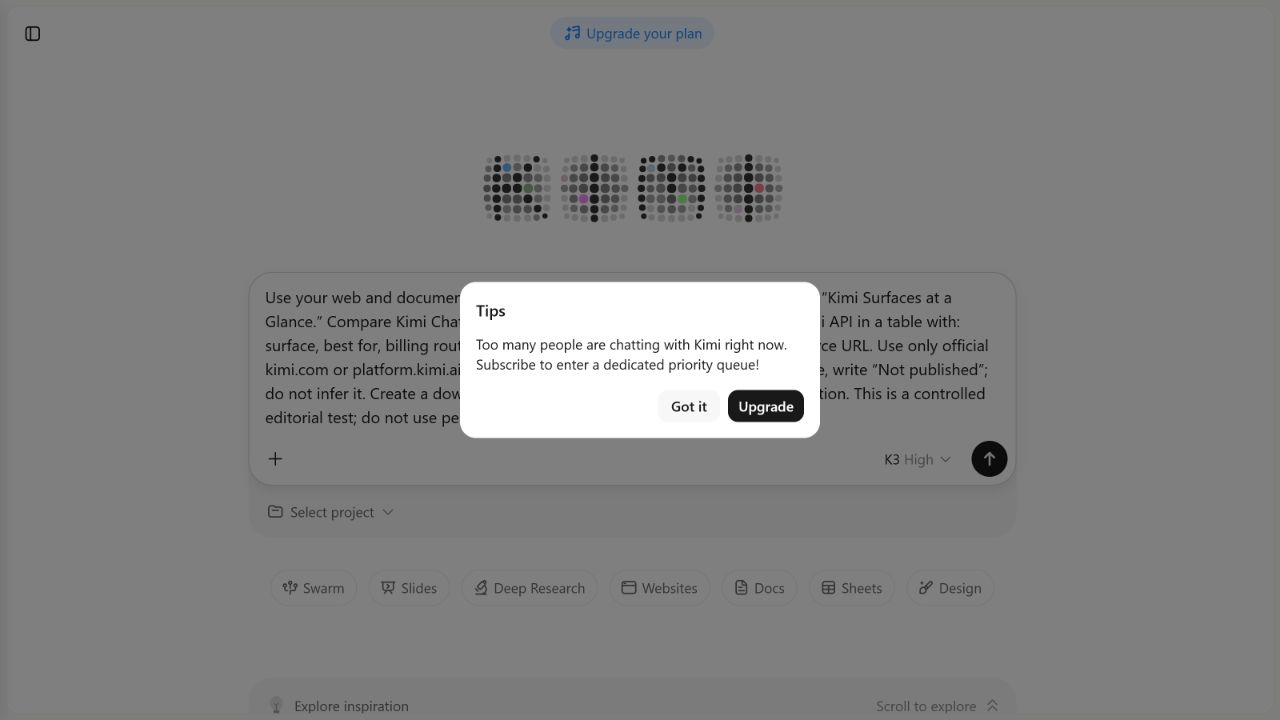
Our signed-in submission attempt from Kimi’s official /agent route on August 4, 2026, with K3 High selected, did not reach execution: a high-demand modal offered a subscription priority queue. We therefore report an access blocker, not a capability, latency or quality result.
Independent guide: Kimi AI Guide is not affiliated with Moonshot AI. Product facts below come from official Kimi sources checked on August 4, 2026. We also document one signed-in access attempt that was blocked before execution. It is not presented as an Agent performance test.
Kimi Agent at a glance
| Question | Current documented answer | What it means in practice |
|---|---|---|
| What is it? | An autonomous assistant that plans a task, invokes tools and produces a deliverable | Use it when the workflow matters as much as the final text |
| What powers it? | Kimi K3 | K3 is the underlying model; Agent is the product layer that adds planning and tools |
| How many tools? | More than 20, according to Kimi | This is a vendor claim, not our independent tool count |
| What can it produce? | Websites, Word/PDF/Markdown documents, spreadsheets, slides and research reports | The usable result still needs human validation and, for code, functional testing |
| How long does a task take? | Kimi says a standard Agent task typically takes 5–20 minutes | Actual time can vary with queue, plan, task and failures |
| What is the Agent context limit? | 256K characters in the Agent limitations article | Do not rewrite this as tokens or combine it with K3’s model context window |
| How many files can it return? | Standard Agent typically outputs one file per task | Kimi directs multi-file work to Agent Swarm |
| Can it access a local computer? | Standard Agent runs in the cloud and cannot directly access local files or an enterprise intranet | Upload authorized files; use Kimi Work for permission-bounded local-folder work, and WebBridge only when controlled browser access is required |
| How is it billed? | Membership features share a credit pool; consumption is based on actual token use | There is no reliable universal cost per task |
The product, duration, context and output statements above are documented by Kimi in its Agent overview, Agent features and limitations, and Agent credits and billing. They are not independent performance findings.
What Kimi Agent is—and is not
Kimi Agent adds an execution loop around the model. Kimi describes that loop as task planning, tool invocation, autonomous execution, error handling and delivery. In other words, a request can lead to intermediate tool work and a file or working preview rather than only a chat response.
That does not make Agent a guarantee of completion or accuracy. Kimi’s current Terms of Service state that output may be inaccurate, incomplete or unsuitable and must be evaluated independently. A polished report, functional-looking spreadsheet or deployed preview is evidence of delivery, not evidence that every fact, formula or security decision is correct.
Documented capability map
| Capability | What Kimi officially describes | Verification still required |
|---|---|---|
| Websites | Responsive web applications, including frontend, backend and persistent storage scenarios | Test every route, form, calculation, authentication boundary and data operation before public use |
| Documents | Word, PDF and Markdown generation or editing | Check facts, source coverage, formatting, tracked changes and exported file integrity |
| Sheets | Excel/CSV analysis and visualization | Inspect formulas, ranges, units, hidden cells, filters and totals |
| Slides | Automated presentation generation | Check narrative order, source attribution, overflow, images and speaker-facing accuracy |
| Deep Research | Long-form research output | Open every important source and test whether it directly supports the adjacent claim |
| Code | Code generation and debugging in several languages | Run tests, review dependencies and perform a security review appropriate to the risk |
These are capability descriptions from Kimi, not pass rates from Kimi AI Guide. For document-specific verification, use our Kimi PDF and long-document workflow.
Kimi Chat vs Agent vs Agent Swarm
| Mode | Best fit | Execution pattern | Key limitation to remember |
|---|---|---|---|
| Kimi Chat | Questions, drafting, explanation and short iterative work | Conversational response | It is not the documented route for downloadable Word or Excel deliverables |
| Kimi Agent | One complex task that needs tools and a primary deliverable | Multi-step, asynchronous execution | Standard Agent typically returns one file and may lose early details during long revision chains |
| Agent Swarm | Large parallel searches, batch work or a task needing multiple deliverables | A coordinating Agent delegates parallel subtasks | It can consume substantially more credit and takes longer; availability depends on membership |
Kimi currently says Agent Swarm can coordinate up to 300 sub-agents and more than 4,000 tool calls. Those figures are official product claims. We have not independently counted the agents or tool calls, and they should not be treated as a guaranteed allocation for every task. See Kimi’s Agent Swarm documentation.
A simple selection rule
- Use Chat when the desired output can be reviewed directly in the conversation.
- Use Agent when Kimi must plan, use tools and return one principal artifact or working preview.
- Use Agent Swarm only when genuine parallelism or multiple outputs justify the extra time and credit.
- Use Kimi Code when the main workspace is a terminal or IDE rather than Kimi’s hosted Agent interface.
Current Kimi Agent limits
1. The published context unit is characters
Kimi’s Agent limitations page says Agent has a 256K-character context window and gives approximate Chinese- and English-word comparisons. It does not publish that Agent surface as a 256K-token window.
That distinction matters. Characters and tokens are not interchangeable, and a product’s usable context can include instructions, tool results, file extraction and conversation history. Do not use the Kimi Context & File Fit Checker to claim an exact Agent fit: the checker deliberately excludes Agent from its token-based model selector for this reason.
2. Long conversations can lose early constraints
Kimi warns that Agent may forget early details over repeated rounds. Its own recommendation is to establish the framework first, make incremental changes and split a large task into two or three phases—or use Agent Swarm.
Our practical interpretation is to keep a short acceptance checklist visible in every major revision. Do not rely on a requirement mentioned only near the start of a long conversation.
3. Standard Agent usually returns one file
The limitations page says standard Agent typically outputs one file per task. If you need a report, spreadsheet and slide deck together, either sequence the work into validated phases or use Agent Swarm. Asking for three files in one standard run and receiving only one is not necessarily a hidden failure; it may be the documented product boundary.
4. Standard Agent cannot directly read local or intranet resources
The hosted Agent runs in the cloud. Kimi says it cannot directly access local computer files or enterprise intranet systems. Uploading a file into the task is different from granting broad local access. Kimi Work is the current desktop Agent for permission-bounded local folders and computer tools; Kimi WebBridge is the separate browser-control layer that can use an existing Chrome or Edge session.
Kimi Claw should not be used as a synonym for local-file access. Kimi’s current documentation describes it as a managed OpenClaw product with one-click cloud deployment, persistent memory and chat-channel connections. It can also link an existing OpenClaw instance, and Kimi documents separate Android and desktop deployment paths. Those options have their own permissions, membership requirements and security boundaries and are distinct from Kimi Work.
5. Execution is asynchronous
Kimi says a standard Agent task generally takes five to 20 minutes and can keep running if you leave the page. Clicking Stop interrupts it. Treat the time range as a vendor estimate, not a service-level guarantee.
6. Credits are variable—and the official pages conflict
The most specific current Agent billing page says Agent, Deep Research, Slides, Docs, Sheets, Kimi Code, Kimi Work and Kimi Claw share one credit pool, with deductions based on actual token consumption. Credits refresh with the subscription cycle, and a complex task can use more than a simple one.
The official Agent limitations page also says each Agent task “typically” consumes one credit unit and gives a monthly task-equivalent range. The current membership page repeats that range but explicitly labels it approximate and based on typical token consumption. Because a “typical unit” is not a fixed price, we do not publish a guaranteed tasks-per-plan number here. Check the live credit balance and the plan screen before starting an expensive run. Our Kimi Membership guide records pricing and plan evidence separately.
How to give Kimi Agent a testable brief
A good Agent request specifies the deliverable, evidence, constraints and pass criteria before execution starts.
Objective
Create [one exact deliverable] for [audience and use].

Inputs
- Use: [named files or approved sources]
- Do not use: [excluded data or sources]
- Source precedence: [which source wins if facts conflict]

Requirements
1. [observable requirement]
2. [observable requirement]
3. [observable requirement]

Acceptance tests
- [input or action] must produce [exact expected result]
- [required element] must be present
- [forbidden behavior] must not occur

Handoff
Return the primary file, a short implementation note, a list of assumptions,
and any test that did not pass. Do not publish or share the result publicly.
Avoid instructions such as “make it professional” as the only quality criterion. Replace them with properties you can inspect: named sections, exact formulas, source fields, responsive widths, supported browsers, file format and test vectors.
Live access check: K3 High was blocked before execution
OBSERVED RESULT: ACCESS ATTEMPT BLOCKED. On August 4, 2026, we used Kimi’s official
/agentroute, selected K3 High, entered an English research task restricted to official Kimi sources and attempted to submit it. Kimi displayed a priority-queue message before the task began. The screenshot does not show a separate selected Agent-mode badge, so we classify the observation by the recorded route and selected K3 High control. No output was generated, and the attempt says nothing about Agent quality, speed or task completion.
What we attempted
The entered task asked K3 High to prepare a sourced comparison of Kimi product surfaces using official kimi.com or platform.kimi.ai material, to label unavailable official information rather than infer it, and to avoid personal data. The queue message covered part of the prompt in the retained screenshot, so we do not present the visible fragments as a complete verbatim prompt.
What the interface showed
The modal said:
“Too many people are chatting with Kimi right now. Subscribe to enter a dedicated priority queue!”
It offered Got it and Upgrade controls. We observed no execution plan, tool activity, generated response, downloadable file, completion state or measurable Agent latency.
| Field | Observed value |
|---|---|
| Date | August 4, 2026 |
| Account state | Signed in |
| Recorded product route | https://www.kimi.com/agent?chat_enter_method=change_model |
| Selected control | K3 High |
| Prompt language | English |
| Prompt source restriction | Official Kimi sources only |
| Blocking state | High-demand priority-queue modal |
| Did task execution begin? | No visible evidence that it began |
| Response or deliverable | None |
| Performance result | Not measured |
| Credit consumption | Not measured |
What this access check does—and does not—show
This evidence supports one narrow statement: one signed-in submission attempt from Kimi’s official /agent route, with K3 High selected, was blocked by a high-demand priority-queue message on August 4, 2026.
It does not establish that:
- Kimi Agent is generally unavailable;
- every account, region, plan or time receives the same message;
- a subscription would guarantee immediate execution;
- K3 High would have completed the task;
- the planned output would have been accurate or useful; or
- Agent is fast, slow, reliable or unreliable.
Queue state is dynamic. A future completed test must receive its own date, account conditions, exact prompt, evidence, acceptance criteria and limitations; it must not be merged silently with this blocked attempt.
Access-check methodology and limits
- We recorded the visible signed-in state, selected mode and blocking message in an original screenshot.
- We stopped when execution did not begin and did not convert the blocker into an invented result.
- The modal obscured part of the entered prompt, so only its verified scope is summarized.
- No output, task duration, credit use or deliverable was available to score.
- This was one access attempt, not a repeated availability study or product benchmark.
- The observation applies only to the recorded date and interface state.
Read our full Testing Methodology for the distinction between official claims, observed results and independent interpretation.
Privacy and publishing checks
Do not put passwords, API keys, private customer data or confidential source files in an Agent task. Kimi’s Data Usage and Sharing page says suitably processed consumer content may be used for model training and documents an account-level opt-out; it does not currently provide a per-file or per-conversation opt-out.
For a generated website, preview and publication are different actions. Do not click a public Publish or Share control during a test unless publication is explicitly required and authorized. Download the output locally, test it, remove secrets and review the code first.
Frequently asked questions
Is Kimi Agent the same as Kimi K3?
No. K3 is the model. Kimi Agent is a product mode powered by K3 that adds planning, tool use, asynchronous execution and deliverable handling.
Is Kimi Agent free?
Availability and credit allowances depend on the current account and plan. Official billing guidance says membership features share one credit pool and consume it according to actual token use. Check the live subscription screen instead of relying on an old fixed-use estimate.
What is Kimi Agent’s context window?
Kimi’s Agent limitations page currently states 256K characters. That is not the same unit as K3’s token context specification. Treat it as an Agent-surface limit and keep the two figures separate.
Can Kimi Agent create Word or Excel files?
Kimi officially documents Word, PDF and spreadsheet creation in its Agent and Docs/Sheets workflows. Verify the downloaded file’s content, formulas and formatting before using it.
Can Kimi Agent access files on my computer?
Not directly in standard cloud Agent mode, according to Kimi. You can upload selected authorized files. For permission-bounded local-folder work, evaluate Kimi Work. Use WebBridge only for a controlled browser session. Kimi Claw is a separate OpenClaw deployment and automation product, not a replacement label for Kimi Work.
Does Kimi Agent run after I leave the page?
Kimi says Agent tasks run asynchronously and can continue in the background. Do not click Stop unless you intend to interrupt the task.
How many files can standard Kimi Agent return?
Kimi says standard Agent typically returns one file per task and recommends Agent Swarm for multiple files. “Typically” is not an absolute technical guarantee, so record the actual deliverable in any test.
Is Kimi Agent output reliable?
No AI output should be assumed reliable without checking. Kimi’s own Terms disclaim guarantees of accuracy and completeness. Verify facts, calculations, code and source support against the task’s acceptance criteria.
Related Kimi AI guides
- Kimi AI Guides
- How to Use Kimi AI Chat
- Kimi Projects: Files, Instructions, Memory and Context
- Using Kimi with PDFs and Long Documents
- Kimi K3 model guide
- Kimi Membership pricing and limits
- Kimi AI Test Lab
Official sources for fact-checking
The four product-boundary sources added below were rechecked on August 5, 2026; the remaining sources retain their August 4 verification date.
- Kimi Agent overview
- Kimi Agent features and limitations
- Kimi Agent credits and billing
- Kimi Agent Swarm
- Kimi Docs and Kimi Sheets overview
- Kimi Websites overview
- Kimi Membership pricing and plan overview
- Kimi Data Usage and Sharing
- Kimi Terms of Service
- Kimi Work introduction
- Kimi WebBridge introduction
- Kimi Claw overview
- Kimi Claw Android overview