
Kimi Websites is Kimi’s dedicated AI website-building product. According to Kimi’s current Help Center, it can turn a natural-language brief, design mockup, screenshot or screen recording into a working site, then provide a live preview, editable versions and downloadable project files. Kimi also documents optional backend storage and login capabilities for appropriate projects.
The most important operational distinction is simple: preview is not publication. Kimi says a generated site stays inside the conversation preview until the user manually selects Publish. Publishing deploys it to the public internet. That boundary should remain explicit in every test, especially when a project contains unfinished copy, private data or unreviewed code.
Our first controlled Kimi Websites test did not reach the builder. On August 4, 2026, we submitted a fixed 12-condition brief for a small Context Split Calculator with K3 High selected. A high-demand subscription/priority-queue modal appeared repeatedly before planning or generation began. No preview, source package, version or export existed to inspect. The result is therefore BLOCKED / NOT RUN, not a failed website and not a performance score.
Independent guide: Kimi AI Guide is not affiliated with, endorsed by or sponsored by Moonshot AI. Product descriptions below come from current official Kimi pages checked on August 4, 2026. Our access attempt is labeled separately from those official claims. See our Testing Methodology.
Kimi Websites at a glance
| Question | Current official description | Verification note |
|---|---|---|
| What is it? | A full-stack website-building product inside Kimi Agent, powered by Kimi K3 | This is Kimi’s product description, not our independent performance finding |
| What can start a build? | Natural-language text, a design mockup or screenshot, a screen recording, or a preset template | Rights to any uploaded reference still need to be checked |
| What frontend can it generate? | HTML, CSS and JavaScript structure, styling and interactions | Generated code still needs functional, accessibility and security review |
| Can it create a backend? | Kimi documents persistent database storage, data management and login scenarios | Confirm that a real backend exists; a frontend-only app may use browser storage instead |
| Can I preview before publishing? | Yes; the site is preview-only until Publish is selected manually | Keep this state during testing |
| Does it keep versions? | Kimi says it creates version records and supports restoration of historical versions | Test restoration before depending on it for recovery |
| Can I download the code? | Yes; complete project files are available through All Files | Platform-managed login and database data do not automatically migrate |
| Can I choose the URL? | Kimi documents a customizable *.ok.kimi.link subdomain after publishing | Custom URL rules and availability apply |
| Is it suitable for production? | Kimi lists prototypes, landing pages, portfolios, simple tools and demos as suitable; it warns against high-availability production use | A generated preview is not a production-readiness certificate |
| What happened in our test? | A repeated high-demand modal blocked entry before generation | No capability, accuracy, speed or export result exists |
Official capability and boundary statements in this table come from Kimi’s Websites Feature Overview, Full-Stack Capabilities page and Websites FAQ.
How Kimi Websites works
1. Start with a brief or visual reference
Kimi documents three main starting routes: describe the website in text, provide a visual reference, or begin from a template. A visual reference can make layout expectations clearer, but it also creates an intellectual-property question. Do not upload a third-party design and request an exact copy unless you have permission to use it.
A text brief is easier to audit when it states:
- the page count and intended audience;
- the exact content and controls required;
- whether the project is frontend-only or needs a backend;
- permitted and forbidden dependencies;
- accessibility and responsive breakpoints;
- numerical or interaction test cases;
- what counts as a completed deliverable; and
- whether the site must remain preview-only.
The Kimi Agent guide explains why observable acceptance criteria are more useful than a request to make something merely “professional.”
2. Review the preview, not just the conversation
Kimi says the generated preview opens beside the conversation and can be switched between desktop and mobile views. The preview toolbar also exposes source files, editing tools, refresh, full-screen viewing and publishing controls.
For a meaningful review, test the actual page:
- enter every fixed test value;
- trigger empty and invalid states;
- use only the keyboard;
- inspect narrow and wide layouts;
- reload the preview;
- inspect the console for runtime errors; and
- confirm that no unrequested external service is called.
Do not award a pass because the page looks finished in one screenshot. A calculator can be visually polished and mathematically wrong; a form can look complete but lack labels, validation or a usable submit path.
3. Make revisions as separate versions
Kimi documents multi-turn editing, visual annotation and historical version restoration. Ask for one bounded change at a time, record the new version and rerun the original acceptance tests. A styling revision should not silently change a formula or remove an accessible label.
If a conversation becomes very long or versions appear inconsistent, Kimi’s FAQ recommends starting a new conversation. Before doing so, download the current source and record which version passed which checks.
4. Export before any handoff
The All Files control is the documented route for downloading the project. Preserve the original archive and calculate a checksum before editing it. Then inspect the source locally and verify that the downloaded build behaves like the preview.
Kimi explicitly warns that two platform features do not automatically travel with exported code:
- Kimi account login; and
- the platform-managed cloud database and its data.
A self-hosted deployment needs its own authentication design, database and data-migration plan. Do not describe a project as portable merely because a ZIP file downloaded successfully.
5. Treat Publish as a separate release decision
Kimi says the site remains preview-only before manual publication. After Publish, anyone with the public link may be able to access it, depending on the selected access controls. A production release should therefore happen only after content, privacy, security, accessibility, links and data behavior have been reviewed.
Use this release gate:
- final copy and legal notices approved;
- no test credentials or synthetic placeholders exposed;
- forms and database writes tested;
- dependencies and licenses reviewed;
- keyboard and mobile behavior verified;
- analytics and tracking disclosed, if deliberately added;
- recovery/export captured; and
- owner explicitly authorizes publication.
Our August 4 attempt never reached this stage and did not select Publish or Share.
Frontend, backend and storage are different claims
Kimi Websites can generate a frontend-only page or a full-stack project. Those outcomes must not be confused.
| Project behavior | Likely implementation | What to verify |
|---|---|---|
| Data disappears after clearing browser data or changing devices | Frontend browser storage such as localStorage | Confirm that the project never promised cross-device persistence |
| Data remains across devices and sessions | A platform-managed backend/database may be present | Inspect the database panel and test create, read, update and delete operations |
| Kimi account login works in the hosted preview | Platform-provided authentication | Do not assume it will work after source export |
| Username/password login is generated | Database-backed application login | Review password handling, authorization, reset flow and data exposure |
Kimi’s FAQ itself warns that some sites described as “full-stack” may actually be frontend-only. Ask for the architecture explicitly, inspect the files and verify persistence rather than relying on the label.
Current documented limitations
Kimi’s Full-Stack Capabilities page currently lists these unsupported scenarios:
- third-party payment integrations such as Stripe or PayPal;
- third-party OAuth login such as Google or GitHub; and
- complex server-side integrations with external SaaS APIs.
The FAQ also says Kimi Websites is not suitable for high-concurrency, high-availability formal production environments or business sites that require long-term stable hosting with a custom domain.
These are product boundaries, not defects discovered by our test. A sensible first project is a bounded landing page, portfolio, interactive prototype or deterministic utility. For developer-controlled production integration, start with the Kimi API guide rather than treating a hosted builder preview as an application platform.
A safer Kimi Websites prompt template
Build [one page / named pages] for [audience and purpose].

Publishing boundary
- Keep the project PREVIEW ONLY.
- Do not publish, share or create a public URL.
- Stop after a working preview and complete downloadable source.

Technical scope
- Use [frontend-only / named backend requirement].
- Allowed dependencies: [list].
- Forbidden: [external APIs, analytics, login, database, remote assets, etc.].
- Store the complete project in the documented preview directory.

Interface requirements
1. [exact visible content]
2. [exact controls and labels]
3. [responsive requirement]
4. [keyboard/accessibility requirement]

Functional acceptance tests
- Input [A] must produce [exact result].
- Input [B] must produce [exact result].
- Invalid input [C] must show [exact error] and never crash.
- Reset must restore [exact state].

Handoff
- Show the preview and complete file list.
- Report any requirement not met.
- Do not publish.
Use synthetic data for the first run. If the task requires private material, read Kimi’s current data-use terms and your organization’s policy before uploading it. Our Files and Long Documents guide provides a separate input-review checklist.
Independent access test: Context Split Calculator
OBSERVED RESULT: BLOCKED / NOT RUN. On August 4, 2026, we reached the signed-in Kimi Websites interface, selected K3 High and submitted a fixed English brief for a preview-only Context Split Calculator. A localized high-demand subscription/priority-queue modal appeared repeatedly before generation began. No planning output, preview, version, source files or export was produced. All 12 product criteria remain NOT TESTABLE.
Why this fixture was chosen
The fixture was designed to test more than visual taste. It combined:
- a deterministic reserve formula;
- two exact positive and negative cases;
- live updates and reset behavior;
- invalid-input handling;
- text-plus-color status communication;
- keyboard, labels and
aria-liverequirements; - a 360-pixel responsive check;
- two exact internal links; and
- an explicit preview-only boundary.
The complete preregistered prompt, acceptance matrix and raw access record are preserved in the downloadable Kimi Websites test pack.
Twelve fixed acceptance conditions
| ID | Requirement fixed before submission | August 4 result |
|---|---|---|
| W01 | One semantic H1 exactly Context Split Calculator, plus one plain-English explanatory sentence | NOT TESTABLE — no preview |
| W02 | Five labelled controls: context window, instructions, source material, desired output and safety margin; margin choices 5/10/15, default 10 | NOT TESTABLE — no preview |
| W03 | reserve = ceil(context × margin / 100) and remaining = context − instructions − source − desired output − reserve | NOT TESTABLE — no code |
| W04 | Case A: inputs 100000, 5000, 60000, 10000, 10% produce reserve 10,000, remaining 15,000, FITS | NOT TESTABLE — no result |
| W05 | Case B: inputs 50000, 5000, 40000, 10000, 10% produce reserve 5,000, remaining −10,000, DOES NOT FIT, shortfall 10,000 | NOT TESTABLE — no result |
| W06 | Immediate updates and thousands separators | NOT TESTABLE — no interaction |
| W07 | Reset restores Case A exactly | NOT TESTABLE — no interaction |
| W08 | Blank, nonnumeric, zero context-window or negative values show an inline error; never NaN or Infinity | NOT TESTABLE — no interaction |
| W09 | Status is communicated by text and color and states exact headroom or shortfall | NOT TESTABLE — no result |
| W10 | Keyboard reachability, programmatic labels, visible focus and an aria-live results region | NOT TESTABLE — no DOM |
| W11 | At 360 pixels: no horizontal scroll; readable controls/results; fully visible buttons | NOT TESTABLE — no preview |
| W12 | Same-tab Methodology and Kimi AI Guides footer links plus the exact independent/not-affiliated note | NOT TESTABLE — no DOM |
The expected arithmetic was independently fixed before the run:
- Case A reserve:
ceil(100,000 × 10%) = 10,000; remaining:15,000. - Case B reserve:
ceil(50,000 × 10%) = 5,000; remaining:−10,000, so the shortfall is10,000.
Those values validate the oracle. They are not Kimi output.
What the interface showed
The blocker was normalized in English as:
“Too many people are chatting with Kimi right now. Subscribe to enter a dedicated priority queue!”
The same state recurred on repeated submission attempts; the exact retry count was not retained and is not claimed. The retained screenshot shows the prompt beneath the localized modal.
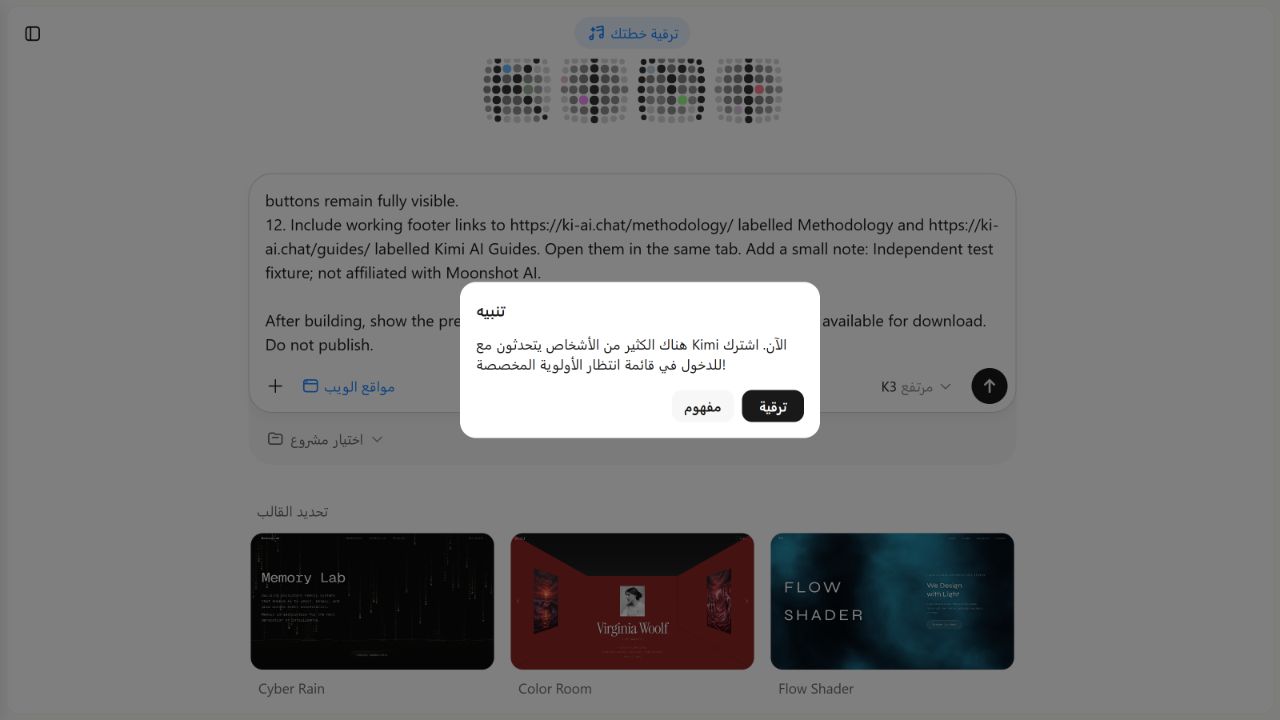
Result record
| Field | Recorded observation |
|---|---|
| Date | August 4, 2026 |
| Account evidence | Signed in; separate account screen showed Free |
| Displayed builder/model | Kimi Websites; K3 High selected |
| Prompt | Fixed 12-condition English brief |
| Publishing instruction | Preview only; do not publish or share |
| Blocking state | High-demand subscription/priority-queue modal |
| Planning or generation | None observed |
| Preview | None |
| Source files/version | None |
| Download/export | None |
| Public URL | None created |
| Criteria evaluated | 0 / 12 |
| Criteria not testable | 12 / 12 |
| Performance score | Not calculated |
Do not rewrite 0 conditions evaluated as 0/12 failed. The calculator did not exist, so there was no product output to score.
What this evidence supports
It supports one narrow statement: one signed-in Free-account test window on August 4, 2026 was blocked before Kimi Websites generation by a repeated high-demand priority-queue modal.
It does not establish that:
- Kimi Websites cannot build the calculator;
- the 12 requirements would pass or fail;
- the product is generally unavailable;
- a paid plan would guarantee execution;
- generation is fast or slow;
- the code is accessible, secure or portable; or
- publishing would have succeeded.
Evidence and methodology
The downloadable Kimi Websites test pack contains the full attempt record, exact prompt, signed-in entry capture, blocker capture and account-context screenshots. The blocker image reproduced above is also available as a standalone full-size file.
The account screen showed 20.69% aggregate usage and an August 28, 2026 reset. That is context only: it is not a per-feature Websites quota and does not prove why the blocker appeared.
Read the site-wide Testing Methodology and browse the Kimi AI Test Lab for the distinction between access, observed output and measured performance.
Frequently asked questions
Is a Kimi Websites project public by default?
Kimi’s current documentation says no. A generated website is preview-only until the user manually selects Publish. Still, verify the visible state and do not place private data in an unreviewed project.
Can Kimi Websites generate a backend and login?
Kimi officially documents persistent database storage, Kimi account login and database-backed username/password login. Treat that as a capability claim until the actual project is inspected and tested.
Can I export a Kimi website?
Kimi says the complete project can be downloaded through All Files. Kimi account login and platform-managed database data do not automatically migrate to self-hosting.
Does Kimi Websites support Stripe, PayPal or Google login?
The current Full-Stack Capabilities page lists third-party payment and third-party OAuth integration among unsupported scenarios. Check the official page again before planning a project because product boundaries can change.
Did the Context Split Calculator fail the 12 tests?
No. Generation never began, so all 12 conditions were not testable. Reporting a failed calculator would invent a result.
Is Kimi Websites suitable for a production business site?
Kimi recommends it for prototypes, landing pages, portfolios, showcases, simple tools and interactive demos. Its FAQ says it is not suitable for high-concurrency/high-availability formal production or long-term stable custom-domain business hosting.
Does a high-demand message prove I need to subscribe?
It proves only what that account saw at that moment. Plan access, demand and quotas can change. Check the live official plan screen and our separately maintained Kimi Membership guide before purchasing.
Related Kimi AI guides
- Browse all Kimi AI Guides
- Kimi Agent: capabilities, limits and access check
- Kimi Work: desktop permissions and safe-folder test
- Using Kimi with files and long documents
- Kimi K3 model profile
- Kimi API guide for developer-controlled integrations
- Kimi AI Test Lab
- Testing Methodology
Official sources
All official pages below were checked on August 4, 2026. The Help pages did not display a publication or last-update date when checked.