
Kimi Projects are persistent workspaces for tasks that reuse the same reference files, instructions and related chats. A Project is useful when work continues over time or produces several deliverables. For a one-off question with no shared background, a regular Kimi chat is simpler.
The most important context detail is easy to miss: Kimi says Project files are read on demand. Their complete contents are not automatically loaded into every turn. In a Project chat, Kimi documents the injected context as the system prompt, global main memory, Project instructions and Project files selected as needed. Project instructions and files apply inside that Project, not in regular chats or other Projects.
In our August 4, 2026 controlled check, two separate chats in one Project each returned two requested values exactly from the same synthetic text fixture and followed the saved format, source-name and final-marker rules. Both responses were routed to K2.6 Instant during high demand. This was one successful two-chat case, not a product-wide accuracy result.
Independent guide: Kimi AI Guide is not affiliated with Moonshot AI. Product facts and limits below were checked against official Kimi pages on August 4, 2026. On the same date, we completed one controlled Project-file check across two new chats. The result applies only to that Project, file, routing state and pair of prompts.
Kimi Projects at a glance
| Feature | Current official description | Safe interpretation |
|---|---|---|
| Purpose | Persistent workspace for one long-running body of work | Group related chats and stable references; do not use Projects only as a folder for unrelated conversations |
| Shared elements | Project instructions, Project files and related chats | A new chat inside the Project can use the shared material without another upload |
| File retrieval | Files are read on demand | A successful upload does not prove every file or every page was read for a particular answer |
| Project instructions | Plain-text instructions followed in each chat within the Project | Keep them stable, specific and testable; they apply after saving, from the next message or a new chat |
| Context | System prompt + global main memory + Project instructions + Project files read on demand | Global memory and Project instructions are different layers; neither is a substitute for citing a source file |
| Isolation | Project instructions and files do not apply to regular chats or other Projects | Start the chat from the correct Project before relying on its context |
| File ceiling | Up to 50 files; each file no larger than 100 MB | These are upload limits, not extraction-quality or context-completeness guarantees |
| Deletion | Deleting a Project permanently removes its chats, files and instructions | Export anything important before deletion; there is no documented recovery path |
| Kimi Work relationship | Kimi Work Projects are separate from Kimi Chat Projects and do not share data | Do not assume a desktop Work Project will appear at kimi.com or vice versa |
The core statements above come from Kimi’s current Projects help page. They describe the hosted product; they are not independent retrieval-accuracy results.
When to use a Project
Use a Kimi Project when at least one of these is true:
- several chats need the same source files;
- a recurring task needs stable output rules;
- the work produces separate deliverables over time;
- several versions of the same material must remain organized; or
- you want one workspace for a research topic, document series or codebase.
A regular chat is usually better when the task is self-contained, needs no persistent source set and will produce one answer. Creating a Project for every prompt can make source ownership and deletion harder to manage without adding useful context.
Practical examples
| Scenario | Project structure that helps |
|---|---|
| Monthly market brief | One Project with source policy and terminology; a new dated chat for each month |
| Documentation set | Stable style instructions and approved references; one chat per page or release |
| Contract comparison | Current agreement, prior version and definitions file; one chat for extraction and another for reviewed analysis |
| Product research | Source manifest and decision criteria; separate chats for evidence, comparison and final memo |
| Codebase maintenance | Repository documentation and conventions; a separate chat for each issue or feature |
These structures are our independent workflow recommendations, not Kimi product promises.
How Kimi Project context works
Kimi’s Projects documentation publishes this context stack:
| Layer | Where it comes from | Scope | What to do with it |
|---|---|---|---|
| System prompt | Kimi platform | Product-controlled | You cannot treat it as a visible Project rule |
| Global main memory | The account’s Kimi Memory Space | Across conversations where memory is active | Inspect and manage it separately; avoid storing volatile project facts here |
| Project instructions | The Project’s Instructions panel | Chats inside that Project | Put durable role, source and output rules here |
| Project files read on demand | The Project’s Files panel | Available to chats inside that Project | Name files clearly and require file-level citations so retrieval is visible |
Read on demand does not mean fully loaded
Kimi says the model decides which Project files it needs for the question and reads those, rather than preloading every file’s complete text on every turn. This can reduce repeated file handling, but it creates an evidence problem: a fluent answer does not reveal which files were considered or whether an omitted appendix was consulted.
For important work, ask for a source ledger:
Before answering, list every Project file you used.
For each factual claim, include filename, revision/date and page or section when available.
Add a “Not checked” list for Project files you did not use.
If the needed evidence is absent or unreadable, say “Not found in Project files.”
The ledger is a visibility aid, not proof of the model’s internal retrieval path. Open the named file and verify the evidence yourself.
Project instructions are not global memory
Project instructions are rules for a specific workspace. Kimi’s Memory Space is an account-level personalization layer that can retain preferences and user details across conversations. The current Memory documentation lists up to 50 memories with up to 500 characters each, and says users can view, delete or turn memory off.
Because the Project context stack includes global memory, an old preference can influence a Project response even when it is not written in the Project instructions. For reproducible work:
- record whether Memory is enabled;
- inspect relevant saved memories before a formal test;
- put factual project truth in versioned files, not in Memory;
- use Project instructions for stable process rules; and
- require source citations for facts.
Do not delete or clear memory solely for a test unless the account owner has explicitly approved that irreversible or disruptive change.
Project context is not regular-chat context
Kimi says Project instructions and files apply only inside their Project. A regular chat does not inject them, and another Project should not inherit them. Always verify the chat’s Project label before sending confidential material or expecting a shared reference to be available.
How to create and organize a Kimi Project
The exact interface can change, but Kimi currently documents two creation entry points: the plus button beside Projects in the sidebar and New project in the home Project selector.
- Choose a narrow, durable Project name. Kimi currently allows one to 50 characters.
- Add initial Project instructions, or save them immediately after creation.
- Upload only the files that multiple chats actually need.
- Add a manifest that identifies status, revision, purpose and precedence for every file.
- Start a separate Project chat for each deliverable.
- Verify source use and preserve an external copy of final work.
Recommended naming pattern
Use names that expose lifecycle and ownership:
Topic — Deliverable Family — 2026Examples:
Kimi Documentation — English Guides — 2026
Atlas Launch — Research and Briefings — Q4 2026
Policy Review — Current vs 2025 Archive
Avoid a Project named only “Work,” “Research” or “New Project.” Generic names make it harder to confirm that a chat is using the intended context.
A reusable Project instructions template
Project instructions should define how to work, not attempt to hold the entire knowledge base.
Role and audience
You are assisting with [project]. Write for [audience] in [language and level].

Source rules
- Treat files marked Current as authoritative over files marked Superseded.
- Cite filename and revision/date for every project-specific factual claim.
- Use no outside source unless the user explicitly requests web research.
- If sources conflict, show the conflict; do not silently choose.
- If evidence is absent, say “Not found in Project files.”

Output defaults
- Use concise Markdown with descriptive headings.
- Preserve names, dates, units and version labels exactly.
- Separate sourced facts, calculations and recommendations.
- End with Unresolved questions and Files used.

Workflow
- Confirm the requested deliverable and constraints before a large task.
- Use one chat per distinct deliverable.
- Do not publish, share or delete anything without explicit approval.
Customize this template. Do not claim it has been tested in Kimi until the live protocol below is completed.
How to manage Project files reliably
Current documented support
Kimi currently lists PDF, DOCX, XLSX, CSV, TXT, Markdown, common code files and common image formats for Project uploads. Each file can be up to 100 MB, with up to 50 files in a Project.
These are acceptance limits, not quality scores. Scanned PDFs, complex tables, hidden spreadsheet sheets, rotated pages and ambiguous version names can still produce incomplete or incorrect extraction. Use our PDF and long-document workflow and Context & File Fit Checker before relying on a large source set.
Add a file manifest
Keep a short FILE-MANIFEST.md in the Project:
| Filename | Status | Revision | Purpose | Authority | Notes |
|---|---|---|---|---|---|
| product-spec-2026-08-01.md | Current | 2026-08-01 | Product truth | Primary | Replaces July spec |
| product-spec-2026-07-10.md | Superseded | 2026-07-10 | Change history | Archive | Never use for current figures |
| glossary.md | Current | 2026-07-29 | Approved terminology | Primary | Controls capitalization |
Then state the precedence rule in Project instructions. A filename containing “final” is not a reliable version-control system.
Use one chat per deliverable
Kimi itself recommends separate chats for distinct outputs. This prevents a long editing history for one document from consuming attention in a different task while the Project continues to supply the shared instructions and files.
A useful pattern is:
01 — Evidence extraction02 — Gap review03 — Draft04 — Fact check05 — Final handoff
Carry reviewed findings forward through the Project files or a verified handoff document, not by assuming the model will reproduce every conclusion from another chat.
Project quotas: a current official documentation mismatch
Kimi’s official Projects page currently publishes the following table:
| Plan label shown on the Projects page | Free | Go | Pro | Max | Ultra |
|---|---|---|---|---|---|
| Number of Projects | 2 | 20 | 20 | 100 | 100 |
| Project storage | 500 MB | 20 GB | 20 GB | 50 GB | 50 GB |
However, the official membership pricing page served during our August 4 check used a different paid-plan naming set. Kimi does not provide a supported mapping between those names on the two pages. We therefore report the Projects table exactly as labeled but do not map it to a currently purchasable plan.
The Projects page also says chat count per Project and the character limit for Project instructions vary by plan, without publishing the figures in that article. Check the capacity bar and live subscription screen in your own account before purchasing or planning a migration. See our Kimi Membership guide for separately verified plan information.
Live context test: one Project file across two new chats
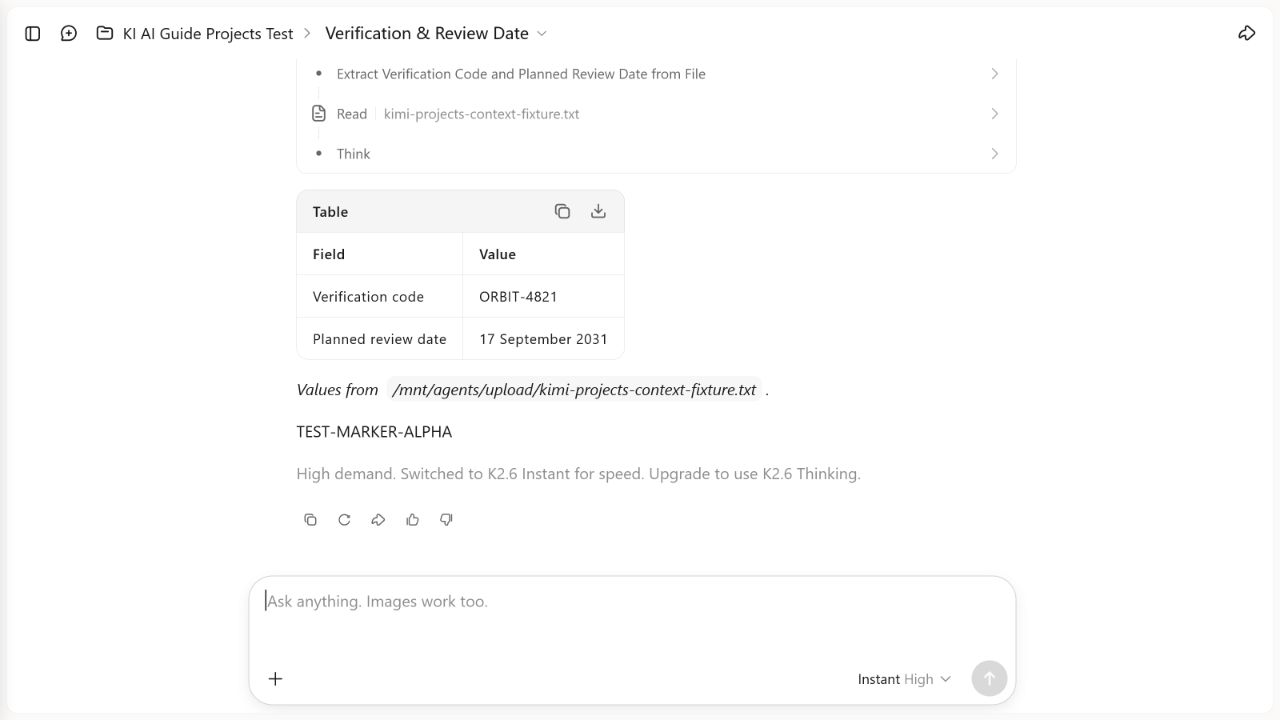
OBSERVED RESULT: PASSED FOR THIS ONE CONTROLLED CASE. On August 4, 2026, one synthetic text file remained usable across two separate chats in the same Kimi Chat Project. Each chat returned the two requested values exactly, used the required two-column format, named the fixture file and ended with the required marker. Both responses displayed a notice that high demand had switched the request to K2.6 Instant. This is a two-chat observation, not a general reliability claim.
Test setup
| Field | Recorded value |
|---|---|
| Test date | August 4, 2026 |
| Project | KI AI Guide Projects Test |
| Product surface | Kimi Chat Projects, not Kimi Work Projects |
| Fixture | kimi-projects-context-fixture.txt |
| Chats | Two separate new chats inside the same Project |
| Starting control shown | Instant High |
| Service routing shown on both responses | Switched to K2.6 Instant for speed because of high demand |
| Chat 1 elapsed time | Approximately 29.9 seconds |
| Chat 2 elapsed time | Approximately 28.7 seconds |
| Project storage shown | 500 MB |
| Per-file upload limit shown | 100 MB per file |
Original synthetic fixture
The uploaded fixture contained only fictional values created for this test:
KI AI Guide controlled project fixture

All values in this file are fictional and created solely for reproducible testing.

Project name: Northstar Archive
Verification code: ORBIT-4821
Project lead: Nadir Vale
Planned review date: 17 September 2031
Required response format: a two-column Markdown table headed Field and Value

Ground-truth checksum phrase: copper-lantern-seven
The saved Project instructions required each answer to:
- use a two-column table headed Field and Value;
- identify the source filename;
- end with the exact marker
TEST-MARKER-ALPHA; and - avoid inventing a value not present in the Project file.
These are the operative constraints recorded for the test. We do not present them as a verbatim export of hidden or unavailable system instructions.
Chat 1: verification code and review date
The first chat requested the fixture’s verification code and planned review date.
| Field | Expected | Observed | Result |
|---|---|---|---|
| Verification code | ORBIT-4821 | ORBIT-4821 | Pass |
| Planned review date | 17 September 2031 | 17 September 2031 | Pass |
| Table headers | Field and Value | Field and Value | Pass |
| Source filename | kimi-projects-context-fixture.txt | Filename shown in the source line | Pass |
| Final marker | TEST-MARKER-ALPHA | TEST-MARKER-ALPHA | Pass |
The recorded elapsed time was approximately 29.9 seconds. The response also displayed: “High demand. Switched to K2.6 Instant for speed.”
Chat 2: project lead and checksum in a new chat
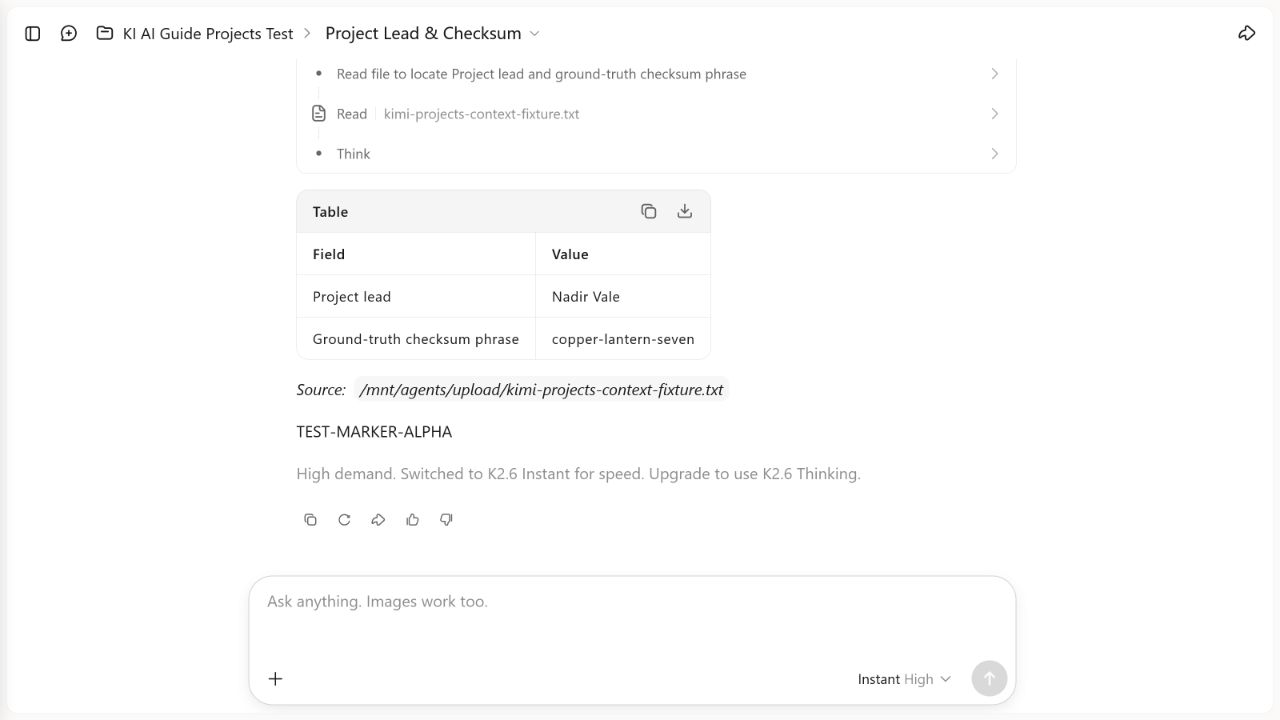
A separate new chat in the same Project requested the project lead and ground-truth checksum phrase. The visible task activity identified the same fixture file.
| Field | Expected | Observed | Result |
|---|---|---|---|
| Project lead | Nadir Vale | Nadir Vale | Pass |
| Ground-truth checksum phrase | copper-lantern-seven | copper-lantern-seven | Pass |
| Table headers | Field and Value | Field and Value | Pass |
| Source filename | kimi-projects-context-fixture.txt | Filename shown in the source line | Pass |
| Final marker | TEST-MARKER-ALPHA | TEST-MARKER-ALPHA | Pass |
The recorded elapsed time was approximately 28.7 seconds. This response displayed the same high-demand switch to K2.6 Instant.
What the result supports
In this one Project and test session:
- the first chat returned both requested fixture values exactly;
- a separate second chat returned two different values from the same named fixture exactly;
- both chats followed the requested table format;
- both named the fixture file and included the exact final marker; and
- the visible routing notice identified K2.6 Instant, so the result must not be attributed to K3 or a thinking mode.
What the result does not support
This test does not establish:
- reliability across repeated runs, other accounts, plans, regions or dates;
- behavior with PDFs, spreadsheets, images, codebases, multiple files or near-limit uploads;
- use of every Project file in every response;
- the internal “read on demand” mechanism;
- isolation from regular chats or other Projects;
- behavior of Kimi Work Projects;
- maximum usable Project storage or file-parsing accuracy; or
- compliance with the “do not invent” rule when a requested field is absent, because both prompts asked for values present in the fixture.
Methodology and limitations
- The fixture was original, fictional, non-sensitive and safe to redistribute.
- Ground truth was fixed before the prompts and checked character by character against both visible responses.
- The two requests were made in separate chats inside the same named Project.
- Both chats visibly identified and read the same named Project fixture.
- We scored only exact requested values, visible formatting, the visible source filename and the final marker.
- Approximate elapsed times are reported as recorded; they are not a latency benchmark.
- The high-demand routing notice is part of the result. We do not relabel these responses as K3, K2.6 Thinking or an unspecified model.
- Correct answers can show successful retrieval in this case but cannot reveal which internal context or retrieval steps Kimi used.
- Two successful chats are too small a sample for a product-wide accuracy percentage.
See our Testing Methodology and, after publication, the Kimi AI Test Lab for evidence and update rules.
Privacy, retention and deletion
Project files persist in the workspace, so upload only material you are authorized to process. Kimi’s Data Usage and Sharing page says suitably processed consumer content may be used for model training and describes an account-level opt-out; per-file and per-conversation opt-out are not currently supported.
Kimi says deleting a Project permanently removes its chats, files and instructions and cannot be undone. Before deletion:
- export final deliverables and evidence you are allowed to retain;
- confirm that no teammate depends on the Project;
- record the source versions outside Kimi; and
- verify that you are deleting the intended Project, not a similarly named workspace.
Do not perform deletion as part of a routine content test.
Frequently asked questions
What is a Kimi Project?
A Kimi Project is a persistent workspace that groups instructions, reference files and related chats for an ongoing body of work.
Are all Project files loaded into every message?
No. Kimi says Project files are read on demand: the model decides which files are needed for the question instead of preloading every file’s full content each turn.
How many files can a Kimi Project hold?
Kimi’s current Projects page says up to 50 files, with each file no larger than 100 MB. Total Project storage depends on the plan. These limits do not guarantee correct parsing or complete use of every file.
Do Project instructions apply to ordinary Kimi chats?
No. Kimi says a Project’s instructions and files apply inside that Project and do not affect regular chats or other Projects.
Does Kimi Memory work inside Projects?
Kimi’s documented Project context includes global main memory. That is separate from Project instructions and Project files. Review account Memory settings when repeatability matters.
Are Kimi Chat Projects and Kimi Work Projects connected?
No. Kimi explicitly says they are separate and do not share data.
Can I recover a deleted Kimi Project?
Not according to the current Projects documentation. Deletion permanently removes the Project’s chats, files and instructions, so export important work first.
Should I put all project facts in Project instructions?
No. Keep instructions focused on durable workflow and output rules. Put changing facts in clearly named, versioned files so they can be cited and replaced.
Related Kimi AI guides
- Kimi AI Guides
- How to Use Kimi AI Chat
- Kimi Agent capabilities, limits and live test
- Using Kimi with PDFs and Long Documents
- Kimi Context & File Fit Checker
- Kimi Membership pricing and limits
- Kimi AI Test Lab
Official sources for fact-checking
All sources were accessed and checked on August 4, 2026.