
Kimi Vision is our name for the visual and multimodal understanding available inside Kimi Chat; Kimi does not present it as a separate product in the documentation reviewed for this page. The current Help Center says Kimi can work with images, video and office documents, and can return structured JSON. Those are vendor-described capabilities. They do not establish accuracy on a particular image, chart or recording.
We therefore ran one controlled consumer-chat test on August 5, 2026. Six synthetic PNG images and one six-second WebM video were attached in a fixed order, followed by one prompt that requested exact JSON fields. The answer passed 35 of 36 atomic checks (97.2%) against ground truth frozen before submission.
ONE CONTROLLED RUN COMPLETED — 35/36 EXACT CHECKS PASSED. The composer displayed Instant / High when the prompt was sent. The completed response then displayed an automatic high-demand switch notice identifying K2.6 Instant. We attribute the output to that completed route, not to K3, and we make no product-wide 97.2% accuracy claim.
Kimi AI Guide is independent and is not affiliated with, endorsed by or sponsored by Moonshot AI.
Test result at a glance
| Field | Recorded result |
|---|---|
| Protocol | KVISION-SYNTHETIC-V1 |
| Date | August 5, 2026 |
| Surface | Signed-in consumer Kimi web chat; Arabic interface; English prompt and output |
| Files | Six synthetic PNG images and one synthetic WebM video |
| Submission count | 1 |
| Corrections, retries or regeneration | None |
| Displayed at send | Instant / High |
| Completion notice | Automatically switched under high demand to K2.6 Instant |
| Scoring | Exact JSON value equality against a frozen oracle; no partial credit |
| Structured output | Valid JSON; all required top-level keys present |
| Passed | 35/36 atomic checks |
| Exact score | 97.2% |
| Only failed field | table.missing_cell: expected "South Q3"; returned null |
This is a one-account, one-run result. It does not estimate how often Kimi succeeds across other accounts, models, modes, languages, file types, image quality levels or real-world tasks.
What Kimi officially says about visual input
Kimi’s current Getting started with Kimi page describes K3 as natively multimodal and says it can understand images, videos and office documents. The same page lists common image inputs such as PNG, JPEG, WebP and GIF, describes video input and video understanding, and lists JSON as a supported structured output format.
The official Kimi overview says the consumer product supports PDF, Word, Excel, PPT, images, TXT and video, with a stated limit of up to 100 MB per file and 50 files per session. Those are current vendor statements, not limits independently stress-tested by this page.
Our live account accepted the seven selected attachments, including a WebM file. The Help Center’s video examples name MP4 and related input methods; our successful WebM attachment is therefore a dated observation from this account, not a promise that every Kimi surface or future uploader will accept WebM.
The official page describes K2.6 as the faster conversation and Q&A option and says its output is text rather than editable office files. Our completed K2.6 Instant route returned text in the requested JSON structure. We did not test editable-file generation here.
What the benchmark was designed to check
The test used seven small synthetic fixtures so every scored value could be known before Kimi saw the files. It covered:
- printed OCR from a quality-control label;
- handwriting-style OCR from a short lab note;
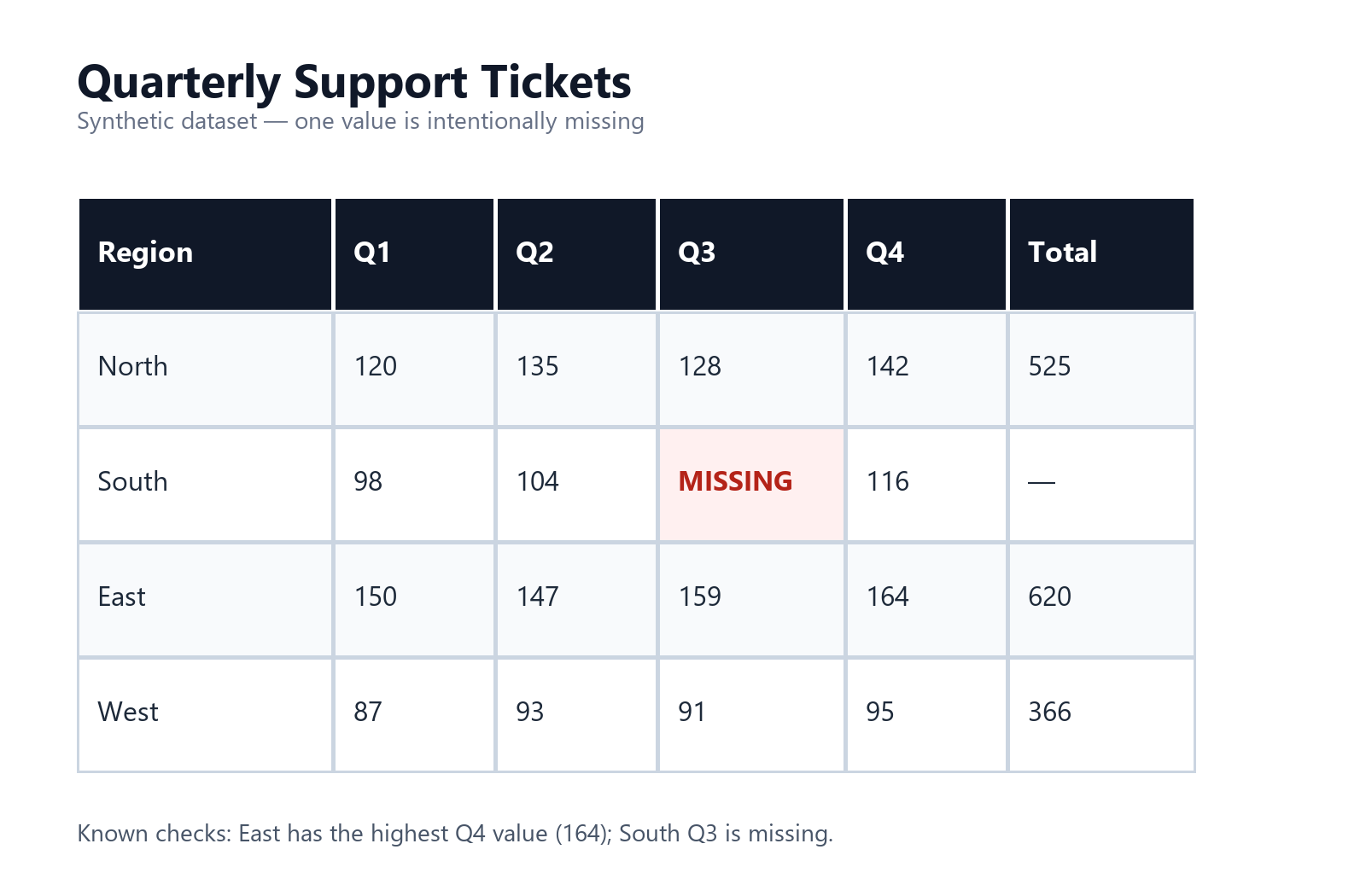
- locating and reading values in a quarterly table;
- comparing two lines in a four-month chart;
- reading status cards and one inventory row in an interface mockup;
- counting objects and reading a clock in a synthetic desk scene; and
- tracking simple shapes, direction, sequence and duration in a six-second video.
This is primarily an atomic perception and extraction test. It does not test diagnosis, broad visual question answering, medical images, document sets, noisy phone footage, spatial planning, image-origin search, long-video summarization or the safety of actions inferred from a screenshot.
How the seven fixtures were created
All fixtures were original, synthetic and free of personal or confidential data.
Five PNGs were generated locally from fixed values: the printed label, handwriting-style note, support-ticket table, resolved-cases chart and inventory interface. Their text, numbers, colors and layout were set before the run.
The desk scene was generated from a constrained visual brief and then checked manually. Its frozen oracle contained one red mug, two blue notebooks, three yellow sticky notes, one black pen, a clock reading 10:10, a green plant in a white pot and a laptop with a blank light-gray screen.
The six-second WebM was created from a deterministic canvas animation and played back in a browser before upload. A red square moved to the right, a yellow triangle appeared in the stage labelled 2 - APPEAR, and the ending displayed a green circle and the word COMPLETE.
The resulting ground-truth.json was frozen before submission. Kimi received the seven fixtures and the test prompt, but it did not receive the ground-truth file or the scorer.
Synthetic generation makes the answers auditable, but it also narrows realism. Clean type, high contrast, simple layouts and explicit video labels can make these tasks easier than photographs, scans and recordings encountered in normal work.
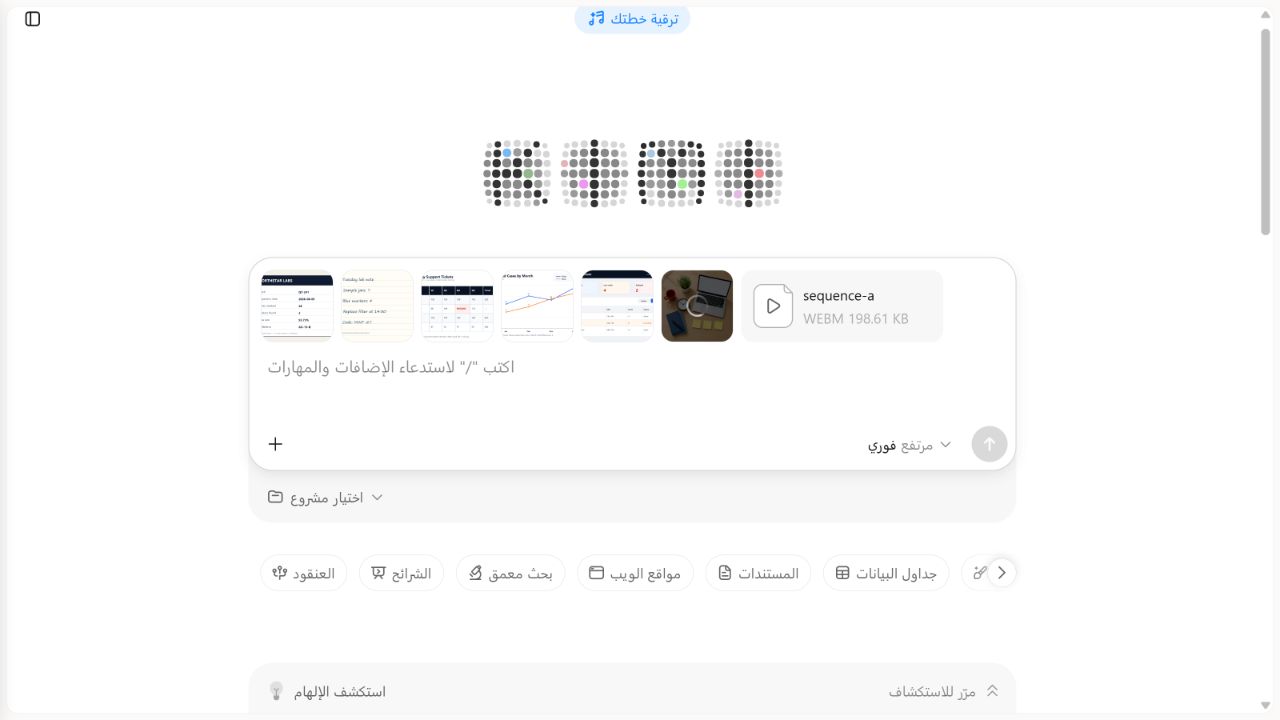
Frozen ground truth
| Fixture | Scored facts known before submission |
|---|---|
| Printed label | Batch Q7-241; 48 units; 3 defects; 93.75% pass rate; reference AX-19-B |
| Handwriting-style note | 7 sample jars; 4 blue markers; filter time 14:30; code MINT-27 |
| Support-ticket table | Missing cell at South Q3; East Q4 is 164; North total is 525 |
| Resolved-cases chart | Nova exceeds Orion only in March; April difference is 4; April values are Orion 30 and Nova 26 |
| Inventory interface | 18 open orders; 4 low-stock; 2 delayed; filter Active; Sensor Kit stock 2; last sync 09:42 UTC |
| Desk scene | 1 red mug; 2 blue notebooks; 3 yellow sticky notes; 1 black pen; clock 10:10; white plant pot; blank laptop screen |
| Six-second video | Red square moving right; temporary yellow triangle at 2 - APPEAR; final green circle; final word COMPLETE; 6 seconds |
Each item in that table maps to one scored JSON field, except that descriptive material not requested by the prompt was not scored. The six group counts add to 36 atomic checks: 5 printed, 4 handwriting, 3 table, 4 chart, 6 interface, 7 scene and 7 video.
The exact one-shot prompt
The following prompt was sent once, after the seven files were attached in the recorded order:
The attachments are seven synthetic benchmark fixtures created for this test. Analyze them in upload order without web search or outside assumptions. Return valid JSON only, with exactly these top-level keys: printed_label, handwriting, table, chart, ui, scene, video, limitations. For printed_label return batch, units_checked, defects_found, pass_rate, reference. For handwriting return sample_jars, blue_markers, replace_filter_time, code. For table return missing_cell, east_q4, north_total. For chart return month_nova_exceeds_orion, april_difference, april_orion, april_nova. For ui return open_orders, low_stock, delayed, filter, sensor_kit_stock, last_sync. For scene return red_mugs, blue_notebooks, yellow_sticky_notes, black_pens, clock_time, plant_pot_color, laptop_screen_state. For video return moving_shape, moving_direction, temporary_shape, temporary_shape_stage_or_time, final_shape, final_word, duration_seconds. Use null for anything not readable and explain only those nulls in limitations. Do not infer a hidden value.The prompt prohibited web search and outside assumptions, required valid JSON and instructed the model to use null rather than invent an unreadable value. No clarification, repair prompt or second attempt followed.
Scoring method
The saved response was parsed as JSON and compared field by field with the frozen oracle.
- One exact expected value equalled one pass.
- A wrong value, omitted value or
nullwhere the oracle expected a value equalled one failure. - No partial credit was awarded.
- String case, labels and numbers were checked against the specified representation.
- Numeric
6.0and integer6were treated as the same numerical duration. - The free-text
limitationsfield was retained but not scored. - The answer was not corrected before scoring.
This simple rule avoids subjective grading. It does not mean all 36 checks have equal real-world importance. Reading a batch code and understanding a six-second sequence receive the same single-point weight here.
Results by fixture
| Fixture group | Passed | Total | Result |
|---|---|---|---|
| Printed OCR | 5 | 5 | All requested label fields exact |
| Handwriting-style OCR | 4 | 4 | All requested note fields exact |
| Table | 2 | 3 | Two numeric checks exact; missing-cell location returned as null |
| Chart | 4 | 4 | Month comparison and all April values exact |
| Interface screenshot | 6 | 6 | Summary cards, filter, row stock and sync time exact |
| Desk scene | 7 | 7 | Counts, clock, pot color and screen state exact |
| Video | 7 | 7 | Shape, direction, temporary stage, ending and duration exact |
| Overall | 35 | 36 | 97.2% for this one run |
The answer also met both structural checks: it parsed as JSON and contained all eight required top-level keys.
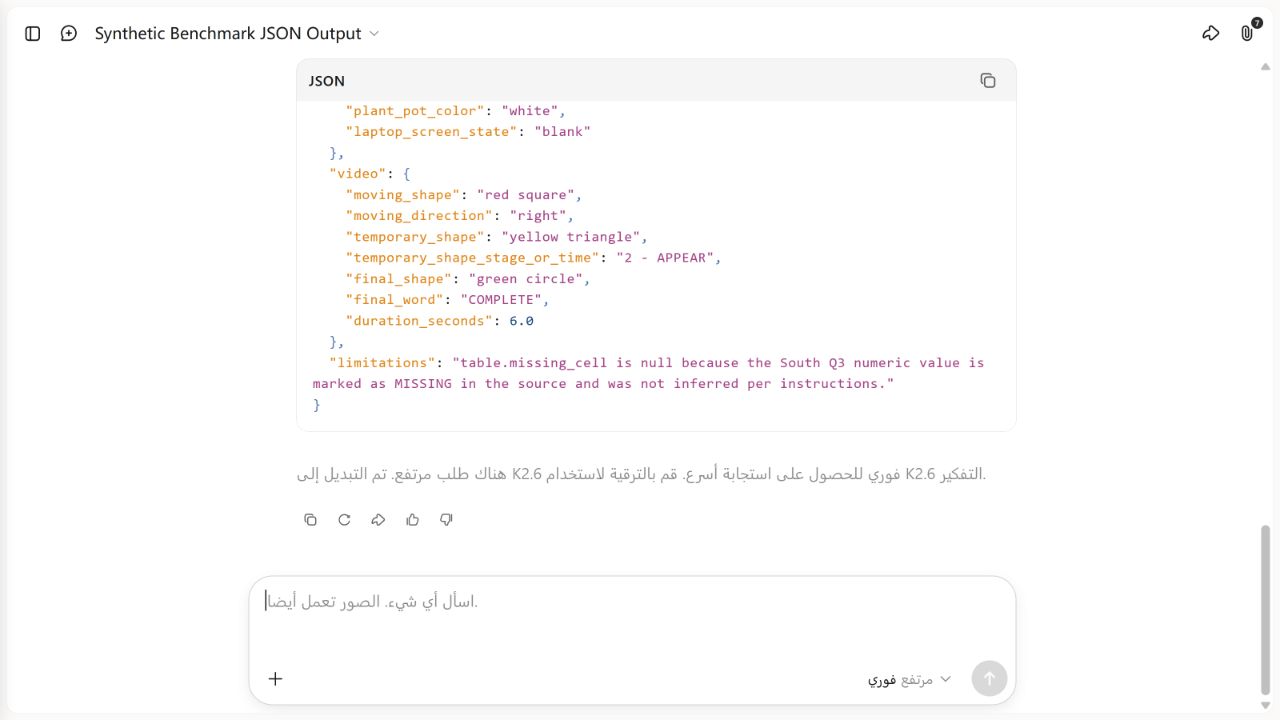
Raw saved JSON response
This is the complete saved answer from the only submission. Line wrapping in the live interface differed, but no field was repaired before scoring.
{
  "printed_label": {
    "batch": "Q7-241",
    "units_checked": 48,
    "defects_found": 3,
    "pass_rate": "93.75%",
    "reference": "AX-19-B"
  },
  "handwriting": {
    "sample_jars": 7,
    "blue_markers": 4,
    "replace_filter_time": "14:30",
    "code": "MINT-27"
  },
  "table": {
    "missing_cell": null,
    "east_q4": 164,
    "north_total": 525
  },
  "chart": {
    "month_nova_exceeds_orion": "March",
    "april_difference": 4,
    "april_orion": 30,
    "april_nova": 26
  },
  "ui": {
    "open_orders": 18,
    "low_stock": 4,
    "delayed": 2,
    "filter": "Active",
    "sensor_kit_stock": 2,
    "last_sync": "09:42 UTC"
  },
  "scene": {
    "red_mugs": 1,
    "blue_notebooks": 2,
    "yellow_sticky_notes": 3,
    "black_pens": 1,
    "clock_time": "10:10",
    "plant_pot_color": "white",
    "laptop_screen_state": "blank"
  },
  "video": {
    "moving_shape": "red square",
    "moving_direction": "right",
    "temporary_shape": "yellow triangle",
    "temporary_shape_stage_or_time": "2 - APPEAR",
    "final_shape": "green circle",
    "final_word": "COMPLETE",
    "duration_seconds": 6.0
  },
  "limitations": "table.missing_cell is null because the South Q3 numeric value is marked as MISSING in the source and was not inferred per instructions."
}
The only failed check: missing_cell
The table visibly placed the word MISSING at the intersection of the South row and Q3 column. The frozen oracle therefore expected:
"missing_cell": "South Q3"Kimi returned:
"missing_cell": nullIts limitations field explained that the South Q3 numeric value was marked as missing and was not inferred. That explanation shows that the response noticed the correct row and column, but it interpreted missing_cell as a request for the hidden numeric content rather than the location of the missing cell. Under the preregistered exact-value rule, this remains a failure; we did not award semantic partial credit.
The field name was also less explicit than it should have been. A stronger next protocol would request missing_cell_location and separately request missing_numeric_value, with null expected only for the hidden number. We keep the current score because changing the intended meaning after seeing the response would invalidate the test.
The table fixture itself included a caption stating that South Q3 was missing. This made the task partly an OCR-and-field-mapping check rather than a pure table-search challenge. The result must not be presented as proof of general spreadsheet reasoning.
What passed — and what each pass means
Printed and handwriting-style OCR
All five printed-label fields and all four handwriting-style fields matched exactly. This includes alphanumeric codes, a percentage and a time. It shows that the completed route extracted these nine clean synthetic fields in this run. It does not establish performance on low-resolution scans, natural handwriting, rotated labels, damaged documents or other languages.
Chart reading
Kimi correctly identified March as the only month when Nova exceeded Orion and returned the exact April values and difference. The chart had a small number of clean points and clear series styling. It did not test crowded axes, uncertainty bands, dual scales, logarithmic charts or charts whose values must be estimated between ticks.
Interface reading
All six requested interface facts matched: three status counts, the active filter, Sensor Kit stock and the last-sync time. The mockup was static and uncluttered. No click, navigation, permission decision or action was requested, so this is not an interface-control or agent-safety result.
Scene understanding
All seven scene checks matched, including object counts, the clock, pot color and laptop screen state. The scene was synthetic, visually clean and designed around the requested objects. One successful generated scene does not estimate accuracy for crowds, occlusion, unusual viewpoints, fine-grained product recognition or safety-critical inspection.
Short-video understanding
All seven video fields matched. Kimi tracked the red square’s rightward movement, the temporary yellow triangle, its labelled stage, the final green circle, the final word and the six-second duration. The animation was short, deterministic and included explicit stage text. This is not evidence about speech, fast cuts, real-world motion, long recordings, event causality or frame-precise timestamping.
Why this is not a K3 benchmark
The composer displayed Instant / High when the submission was sent, but the finished answer displayed a high-demand notice saying the request had been switched to K2.6 Instant. That execution notice is part of the evidence and takes priority over the pre-send selection when attributing the output.
We therefore do not label 35/36 as a K3 score, compare it with K3 vendor benchmarks or use it to resolve K3 versus K2.6 quality. A clean model comparison would require fixed, verified routing, the same frozen inputs, separate fresh sessions, repeated runs and a declared policy for capacity fallbacks. None of that occurred here.
For model-specific specifications and access, use the Kimi K3 model guide and Kimi K2.6 model guide. This page owns the controlled visual-input workflow and this recorded consumer-chat result.
A safer way to test visual understanding yourself
- Start with synthetic or non-sensitive material. Do not make a private document your first upload.
- Freeze expected answers first. Record exact text, counts, calculations and timestamps before opening the model.
- Separate task types. OCR, chart reading, object counting and temporal video reasoning should have separate scored fields.
- Use explicit field names. Prefer
missing_cell_locationover an ambiguous label such asmissing_cell. - Request a machine-checkable format. JSON makes missing and changed fields visible, but validate that it parses before scoring values.
- Record the full execution state. Save the date, product surface, account class, locale, selected mode, routing notice, prompt, file order and raw response.
- Allow no hidden correction. Score the first output or preregister how retries will be counted.
- Retain failures. A sensible explanation does not turn an exact mismatch into a pass.
- Repeat before generalizing. One run can document an event; it cannot estimate a stable error rate.
For image-origin discovery and source verification rather than visual extraction, use the Kimi Search guide. For long files and context planning, use the Kimi files and long-documents guide.
Privacy and safety checklist
- Remove names, faces, account identifiers, addresses, signatures and hidden metadata that the task does not need.
- Use a copy of the source file and preserve the original offline.
- Do not upload medical, legal, financial, employment or identity material without appropriate authority and review.
- Treat OCR output as unverified until it is compared with the source.
- Recalculate chart and table values outside the model before using them in a decision.
- Do not let a screenshot alone authorize a payment, deletion, message, publication or permission change.
- Start a fresh chat for a new task and remove a sensitive conversation when the retention risk outweighs its value.
Kimi’s official getting-started page notes that chat history is retained and recommends cleaning up sensitive information. Product settings and policy can change, so review the current terms and privacy controls before uploading material that is not synthetic.
Limitations of this test
- One account, one run: there is no variance estimate or confidence interval.
- Automatic routing: the final notice identifies K2.6 Instant, so K3 performance was not isolated.
- Synthetic data: all material was constructed for easy ground-truth verification and may be cleaner than normal inputs.
- Small sample: 36 equally weighted checks cannot represent all visual tasks.
- Prompt ambiguity:
missing_celldid not explicitly distinguish a coordinate from a hidden numeric value. - Table hint: the table caption exposed the missing location, reducing the reasoning required.
- Simple video: six seconds, a few shapes and visible stage labels do not represent ordinary footage.
- Generated scene: visual generation can introduce regularity or artifacts unlike natural photographs.
- No degradation series: we did not test blur, compression, rotation, glare, occlusion, low light or lower resolution.
- No language comparison: the interface was Arabic, but the fixture text, prompt and output were English.
- No latency or credit score: this protocol did not preregister response-time or billing measurements.
- No safety-action test: Kimi only read files and returned text; it did not act on a device or external service.
- Uploader scope: WebM worked in this dated account session but is not claimed as a universal supported format.
The result should be read as: in one recorded K2.6 Instant-routed consumer-chat response, 35 of 36 predetermined values matched exactly. It should not be shortened to “Kimi Vision is 97.2% accurate.”
Frequently asked questions
Can Kimi analyze images and video?
Kimi’s current Help Center describes image, video and document understanding, and our signed-in consumer session accepted six PNG images and one WebM video. Format, size, plan and surface availability should still be checked in the live interface.
Did this test run on Kimi K3?
Not as a clean completed K3 run. Instant / High was displayed when the prompt was sent, but the finished response showed an automatic high-demand switch to K2.6 Instant. We attribute the recorded output to K2.6 Instant.
Was the score really 97.2%?
Yes, for this frozen 36-field rubric: 35 exact passes divided by 36 checks equals 97.2% rounded to one decimal place. It is not an estimate of general product accuracy.
What did Kimi get wrong?
It returned null for table.missing_cell instead of the expected location South Q3. Its explanation named South Q3 and declined to invent the hidden number, but the exact structured field still failed the frozen oracle.
Did Kimi return valid JSON?
Yes. The saved response parsed successfully and contained all required top-level keys. That structural pass is separate from the 35/36 value score.
Does Kimi officially support WebM video?
The checked Help Center names MP4 as a video example and describes broader video input. Our live consumer session accepted this specific WebM fixture. Treat that as a dated observation, not a universal format guarantee.
Can I use this result for medical images or business documents?
No. The fixtures were synthetic and low risk. High-stakes or confidential material needs domain review, privacy authorization and a task-specific validation set.
Related Kimi guides and tests
- Browse all Kimi AI guides
- How to use Kimi AI Chat
- Kimi Search: sources, image search and verification
- Kimi files and long-document guide
- Kimi K3 model guide
- Kimi K2.6 model guide
- Kimi AI Test Lab
- How We Test Kimi AI
- Sources and Corrections
Official sources and evidence boundary
Official product sources checked August 5, 2026:
The official pages establish what Moonshot AI currently says Kimi supports. They do not validate our independent score. The score comes only from the retained synthetic fixtures, frozen ground truth, exact prompt, raw JSON response and field-level score record listed in the retained evidence record.
Read How We Test Kimi AI for our evidence labels and stop rules. Use Sources and Corrections to report a factual or reproducibility issue.