
Kimi Plugins connect third-party tools and data services to supported Kimi workflows. A plugin can retrieve public data, connect to an authorized account or call a specialist tool, but each case can have different access, permission, privacy and credit consequences.
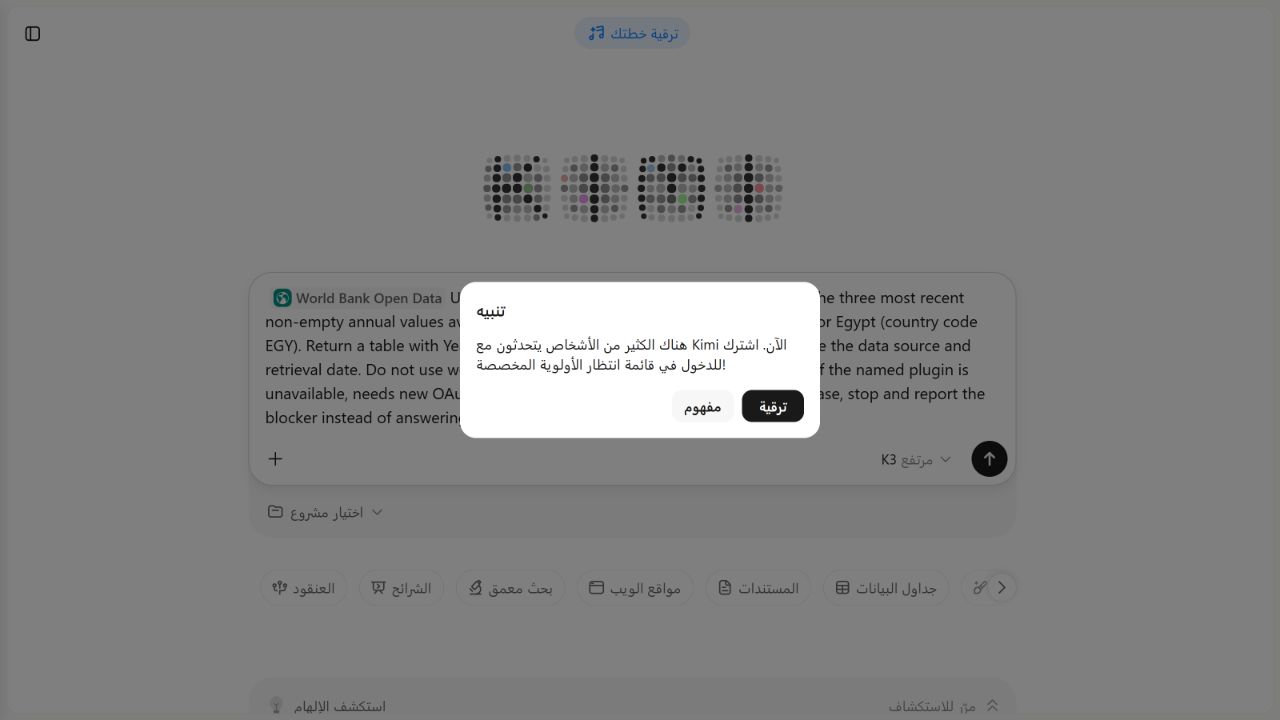
CAPACITY/PAYMENT BLOCKED BEFORE INVOCATION. On August 5, 2026, the installed World Bank Open Data plugin was selectable in signed-in Kimi with K3 and High displayed, and it required no OAuth. We made the protocol’s single allowed send attempt. Kimi created no chat and invoked no plugin; instead, a high-demand alert offered subscription access to a dedicated priority queue. We did not retry or purchase anything. There is no plugin output and no accuracy score.
Kimi AI Guide is independent and is not affiliated with Moonshot AI, the World Bank or any plugin provider.
Kimi Plugins at a glance
| Question | Current official answer | Our dated observation |
|---|---|---|
| What does a plugin do? | Connects an external tool or service so Kimi can call its capability during a task | The selected plugin was available, but capacity blocked the call before invocation |
| Where are plugins supported? | K3, K3 Swarm, Deep Research, Websites and PPT scenarios; Kimi Work has a desktop plugin list | World Bank Open Data was selectable in K3 web on this account |
| Where are they not supported? | Kimi’s current page says Kimi Claw and Kimi Plus conversations do not support plugins | Future rollout changes |
| Must a user sign in? | Yes. Kimi says plugins cannot be installed or used while signed out | The test used a signed-in consumer account |
| Do all plugins require OAuth? | No. Some require third-party OAuth, while some are pre-installed | World Bank Open Data requested no OAuth in our preflight |
| Can availability differ? | Yes. Region, surface and enterprise eligibility affect the visible list | Exact marketplace inventory for this account |
| Can a plugin consume credits? | Some calls consume membership credits based on actual usage; no-call-cost plugins do not add a call charge | No call-cost label or reliable balance was visible; a subscription priority-queue offer blocked execution |
| Did our safe test run? | One bounded send was attempted | No chat or invocation was created, so accuracy was not scored |
These are vendor-documented product statements, not independent pass results. They were checked against Kimi’s Plugins page on August 5, 2026.
Where Kimi says Plugins work
Kimi currently documents plugin use after switching to K3 or K3 Swarm, and in Deep Research, Websites and PPT scenarios. The Kimi Work desktop app has its own built-in Plugin Center. The same Help Center page says Plugins are not yet supported in Kimi Claw or Kimi Plus conversations.
Do not transfer a result between surfaces automatically. A plugin visible in K3 web chat may be absent in Kimi Work, limited to enterprise use, or unavailable in another region. Record the surface, model or scenario, locale, date and account plan whenever access is reported.
How installation and invocation work
On the web, Kimi documents the sidebar Plugins tab, the plus control beside the input and the / menu as entry points. Mobile entry points include the plus control and / menu.
The marketplace can include three different access patterns:
- Pre-installed: available without a manual install step.
- Installable without OAuth: may be added or used without connecting a third-party identity.
- OAuth-connected: redirects to the provider’s sign-in and authorization screen.
Kimi also says non-enterprise users may see an enterprise-only plugin with a disabled Install button. Visibility alone is not proof of usable access.
After installation, a user can manually select a plugin through / or the plus menu. Kimi can also choose one automatically when the task appears relevant, and multiple plugins can be selected. During a controlled test, manual selection of one named plugin is preferable: Kimi says the reply displays an “Using the … plugin” trace when a tool is called, giving the evaluator visible invocation evidence.
In our August 5 access check, World Bank Open Data appeared among added plugins, could be inserted into the composer and exposed an Uninstall action in its My Kimi detail menu. That proves installed/selectable status for this account at that time; it does not prove that a call completed.
Permissions and data boundaries
Kimi’s documentation says that, after a plugin is connected, Kimi accesses relevant content within the scope the user authorized. Third-party plugin data is also subject to that provider’s own terms and privacy policy.
Before authorizing a plugin, check:
- who provides it and where its terms and privacy notice lead;
- whether it requests read, write, create, delete, payment or account-management access;
- which workspace, repository, database, drive or profile it can reach;
- whether the authorization is limited to selected resources;
- whether the task can be completed with public or synthetic data instead; and
- how to revoke the connection.
Do not infer minimal permission from a plugin category or friendly task description. A design plugin, for example, may need an account connection; a public-data plugin may need none. Inspect the actual live authorization screen.
Kimi says a plugin can be uninstalled and its authorization revoked; reinstalling an OAuth plugin then requires authorization again. That is a product-level statement. It does not prove that every provider immediately removes all retained data, logs or legally required records.
For the World Bank candidate, no OAuth page, third-party sign-in or write-permission request appeared before the send attempt. The inspected detail did not present provider terms/privacy links or a call-cost label, so those fields remain not presented, not assumed safe or free.
Credits and charges
Some plugin calls use Kimi membership credits based on actual tool usage. Kimi says plugins with no call cost do not incur an extra call charge. The Help Center does not promise that every plugin in a category is free or publish a universal cost table on the cited page.
A safe preflight is:
- read the plugin’s live detail and credit label;
- capture the visible Kimi credit balance or usage state without exposing account details;
- avoid a payment or purchase flow;
- make only the authorized number of calls; and
- compare the visible balance afterward, reporting
Not observablewhen no reliable meter exists.
Do not describe “no visible balance change” as proof of zero backend cost. Likewise, an error before a tool call is an access or execution event, not an accuracy score.
That distinction applied in our test: after the single send attempt, Kimi showed a high-demand alert and offered subscription access to a dedicated priority queue. The prompt remained in the composer and no chat or tool trace was created. We stopped under the USD 0 cash-spend rule and did not infer a credit charge or zero cost.
Marketplace categories are not fixed inventory
Kimi currently lists categories that include finance, productivity, development, creative and general tools. Named examples include World Bank Open Data, IMF data, SEC, GitHub, Supabase, Cloudflare, Notion, Canva and generation tools. The same documentation warns that plugins vary by domestic or overseas region, surface and enterprise availability.
This page therefore does not maintain a “complete plugin list.” A static list would become misleading as the marketplace changes. The live marketplace and each plugin’s own details remain the source for current access.
Our low-risk public-data test
The frozen protocol is KP-PLUGINS-WB-V1. Its preferred candidate is World Bank Open Data, which Kimi currently names in its marketplace documentation.
The test proceeds only if the live plugin is already installed or pre-installed, requires no OAuth, exposes no write action for this query and does not require a purchase. The candidate passed those pre-send checks. Execution then stopped at the service-capacity/subscription gate. We did not switch plugins or retry because that would exceed the preregistered one-attempt boundary.
Exact submitted task
Use only the World Bank Open Data plugin. Return the three most recent non-empty
annual values available for the World Bank indicator SP.POP.TOTL for Egypt
(country code EGY).

Return a table with Year | Value | Indicator code | Country code. Then state the
data source and retrieval date. Do not use web search, another plugin or values
from memory. If the named plugin is unavailable, needs new OAuth, requests a
write permission or requires a purchase, stop and report the blocker instead
of answering from memory.
This prompt contains no private data and requests a read-only public statistic. It does not authorize creating, changing or deleting content in an external account.
Independent oracle
Before the Kimi send attempt, the evaluator retrieved the same series directly from the World Bank’s unauthenticated V2 Indicators API. The earlier preregistration used mrnev=3, which returned HTTP 400 on this date. The successful current request used:
https://api.worldbank.org/v2/country/EGY/indicator/SP.POP.TOTL?format=json&mrv=3The successful request returned HTTP 200. Its metadata reported lastupdated as 2026-07-13, and all three returned population records were non-empty:
| Year | Population |
|---|---|
| 2025 | 118,365,995 |
| 2024 | 116,538,258 |
| 2023 | 114,535,772 |
The retained UTF-8 JSON is world-bank-egypt-population-oracle-2026-08-05.json, SHA-256 33D42F18C516F4181C383C4EED155654196C5A71C2BFF453A883A2A128E3CCC7. These are a dated oracle, not timeless values: World Bank statistics and the most recent available year can change.
What we will check
| Check | Required evidence | Current result |
|---|---|---|
| Candidate eligibility | Live detail shows the exact plugin and installed state | PASSED PREFLIGHT — installed, selectable, Uninstall action visible |
| No OAuth | No third-party sign-in or authorization request | PASSED PREFLIGHT — none requested |
| Permission scope | Public-data read only; no write/create/delete action | PASSED PREFLIGHT — no authorization or write request appeared |
| Invocation | Kimi visibly identifies the World Bank Open Data plugin call | BLOCKED BEFORE INVOCATION — no chat or tool trace |
| Data accuracy | Three year/value pairs match the dated World Bank API oracle | NOT SCOREABLE — no output |
| Identifiers | SP.POP.TOTL and EGY remain exact | NOT SCOREABLE — no output |
| Source disclosure | Output names the World Bank and gives a retrieval date | NOT SCOREABLE — no output |
| Credit observation | Before/after meter or Not observable, with no purchase | Reliable meter not observable; no purchase; subscription priority offer shown |
| Side effects | No external account or data mutation | PASSED — none connected or changed |
One send attempt was allowed and used. Kimi did not accept it into a chat or begin a plugin invocation. No follow-up or retry was made.
Current result
CAPACITY/PAYMENT BLOCKED BEFORE INVOCATION. At 2026-08-05T21:03:29.844Z (14:03:29.844 PDT), we pressed Send once with World Bank Open Data selected and K3 / High displayed. Kimi responded with a high-demand alert and offered subscription priority-queue access. The URL remained /agent?chat_enter_method=skill_to_agent, the prompt remained in the composer, and no chat, plugin trace or output was created.
| Field | Result |
|---|---|
| Live plugin eligibility | Installed and selectable; K3 / High displayed |
| OAuth request | None |
| Permissions observed | No authorization or write-permission prompt appeared |
| UI send attempts | 1/1 |
| Chats/messages accepted | 0 |
| Visible named-plugin invocation | None — blocked before invocation |
| Year/value matches | Not scoreable — no output |
| Unsupported values | Not scoreable — no output |
| Credit delta | Not observable; no invocation completed |
| Purchase | None; USD 0 spent |
| External write action | None attempted or performed |
Not scoreable is not a zero or an accuracy failure. There is no plugin output to compare with the valid World Bank oracle.
Safe Plugin checklist
- Prefer public or synthetic data for a first test.
- Use one named plugin and one bounded task.
- Review the provider, terms, permissions and credit notice before invoking it.
- Avoid OAuth when the task does not need account data.
- Grant the narrowest available scope when OAuth is necessary for a later task.
- Keep payment, messages, publishing, deletion and account changes out of an initial test.
- Verify important returned data against the original provider.
- Retain the raw output and visible tool trace.
- Revoke an obsolete connection through both available account surfaces when appropriate.
- Never paste a password, token or recovery code into chat.
Plugins versus Skills, WebBridge and API integrations
| Feature | Main purpose | Boundary |
|---|---|---|
| Plugin | Let a supported Kimi surface call a packaged third-party capability | Provider, permissions, credits and regional availability vary |
| Kimi Skill | Package reusable instructions or knowledge for supported agent workflows | A Skill is not automatically a connected external account |
| Kimi WebBridge | Let an authorized desktop workflow interact with a browser through an extension | Browser control has a different installation and permission surface |
| Kimi Work | Run permission-bounded tasks across local desktop resources | Its built-in Plugin Center and local-file permissions require separate checks |
| Kimi API | Build an application against developer endpoints | Your application owns authentication, tool integration and usage controls |
Limits of this guide and protocol
- The candidate’s installed/selectable state was checked on one signed-in account; this does not establish availability for another account, plan, locale or date.
- Official category and support statements can change after August 5, 2026.
- One read-only public-data query does not test OAuth, write scopes, multi-plugin routing or external account revocation.
- A visible invocation label cannot prove every hidden implementation detail.
- A matching result covers three dated values from one data source, not general plugin accuracy.
- A mismatch could reflect plugin retrieval, data-source lag, formatting, revision timing or model synthesis; retain both raw sources before assigning cause.
- No visible credit delta does not prove that no accounting event occurred.
- The test cannot establish a third party’s internal retention or security controls.
- The high-demand alert prevented invocation, so this run says nothing about the plugin’s data accuracy, latency or output format.
Frequently asked questions
Are Kimi Plugins free?
Not necessarily. Kimi says some plugin calls consume membership credits based on actual usage, while plugins with no call cost do not add a call charge. Check the live plugin detail and account meter.
Do all Kimi Plugins require OAuth?
No. Kimi documents both OAuth-connected plugins and pre-installed plugins. Requirements differ by plugin.
Can I use Kimi Plugins while signed out?
No. Kimi’s current documentation says plugins cannot be installed or used while signed out.
Why is a plugin visible but not installable?
It may be limited by region, product surface or enterprise eligibility. Kimi says enterprise-only plugins can be visible to non-enterprise users with a disabled Install control.
Can Kimi select a plugin automatically?
Yes, according to the official page. For a controlled test, we manually select one plugin so the intended tool is fixed and the invocation trace can be checked.
Did KI AI Guide test a Kimi Plugin?
We attempted one bounded World Bank Open Data call after verifying that the plugin was installed, selectable and required no OAuth. Kimi blocked the attempt before chat creation or plugin invocation with a high-demand subscription-priority alert. We did not retry or purchase access, so no credit or accuracy result exists.
Official sources and update policy
- Plugins — Kimi Help Center, checked August 5, 2026.
- About the Indicators API — World Bank Data Help Desk, checked August 5, 2026.
- API basic call structures — World Bank Data Help Desk, checked August 5, 2026.
We will add an accuracy result only after a later authorized run contains a visible named-plugin invocation and raw output. The current blocker, exact prompt and World Bank oracle remain part of the record. See How We Test Kimi AI, browse the Kimi AI Test Lab, and report an issue through Sources and Corrections.