
Kimi Presets let a signed-in user save frequently reused prompt text, insert it into a chat input and edit it before sending. That can reduce repetitive typing, but it does not establish that the resulting answer will be more accurate or consistent than the same prompt pasted manually.
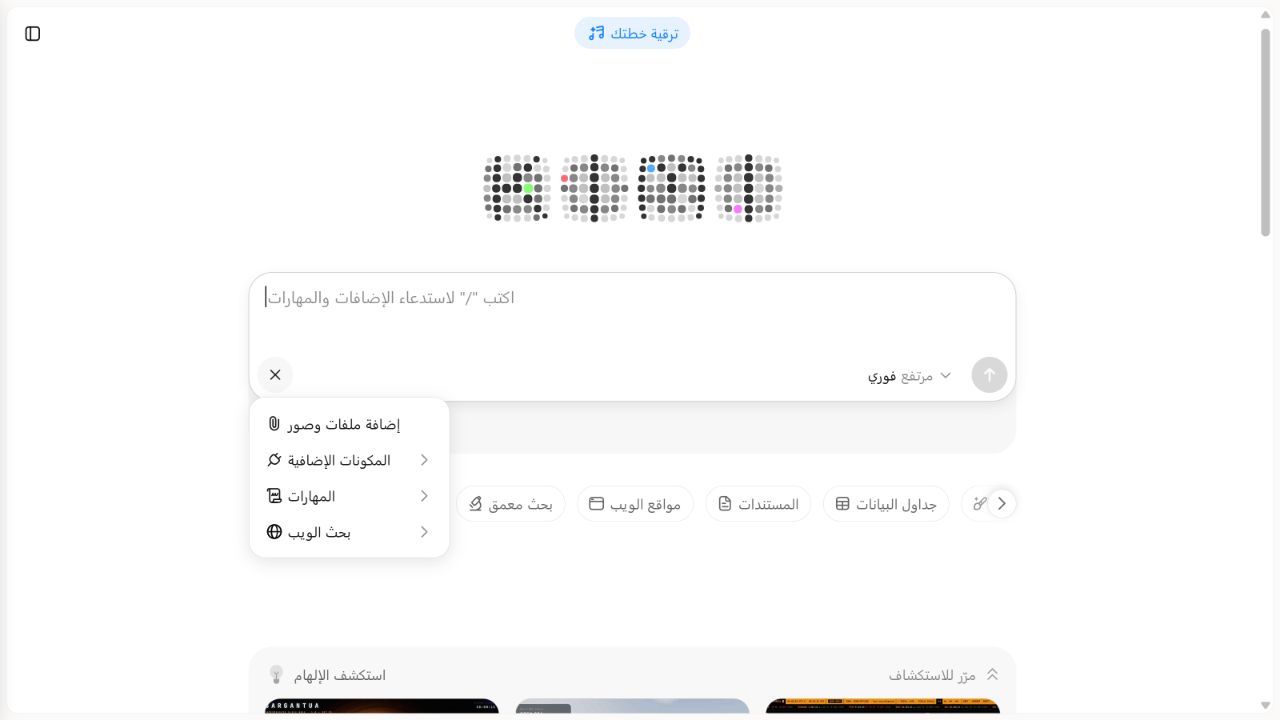
ACCESS BLOCKED — PRESETS ENTRY POINT NOT EXPOSED. On August 5, 2026, the signed-in Kimi web interface exposed files, Plugins, Skills and Web search, but no Presets or Quick Phrases entry in the composer
+menu, slash menu or My Kimi navigation. We stopped at the access gate: no Preset was created, no Kimi message was submitted, and 0/5 pairs were run. There is no consistency score or performance conclusion.
Kimi AI Guide is independent and is not affiliated with Moonshot AI.
Kimi Presets at a glance
| Question | Current documented behavior | Independent status |
|---|---|---|
| What is a Preset? | Saved prompt text that can be inserted into the input with one selection | Official description only |
| Where can it be created? | Kimi’s website or app, through the plus/input-area Presets entry point | Entry was not exposed on our signed-in web account on August 5, 2026 |
| What is saved? | A title and the full prompt content entered by the user | No test item created |
| Can it be changed before sending? | Yes. Selecting a Preset fills the input; the text can be edited before Send | Not independently reproduced because access was blocked |
| Can it be managed? | Kimi documents edit, delete and reorder controls | Management entry was not exposed; no control was used |
| Does it support long text? | Kimi says Presets support long text and complex multi-step instructions | No numeric maximum is stated on the cited page; not stress-tested |
| Does a Preset improve output quality? | The Help Center recommends saving well-tuned prompts for repeatable work | This is advice, not a measured pass rate; our comparison is ACCESS BLOCKED / NOT RUN |
Product statements in this table come from Kimi’s current Presets documentation, checked August 5, 2026.
What a Kimi Preset does
A Preset is a reusable text shortcut. The official workflow says that selecting one auto-fills its content into the current chat box. You can send the text unchanged or edit it first.
That definition creates an important testing boundary: the Preset condition must contain exactly the same final text as the manual condition before Send. If the text differs, a response difference could be caused by the prompt rather than by the insertion route.
A Preset is not:
- a separate model or generation mode;
- hidden evidence that Kimi followed the saved instructions;
- a guarantee of identical answers across repeated runs;
- a substitute for checking dates, calculations and sources;
- proof that a long prompt fits every Kimi surface; or
- a safe place for passwords, API keys or confidential records.
How to add and use a Preset
The current official steps are:
- Open Kimi on the web or in the Kimi app and sign in.
- Open the Presets entry point, which Kimi documents near the plus button beside the chat input.
- Select Add Preset.
- Enter a short identifying title and the complete prompt content.
- Save it.
- In a chat input, select the Preset to fill the prompt box.
- Read the inserted text, replace any placeholders and edit task-specific details before sending.
Controls and wording can change. Do not rely on a screenshot from another account or region when the live interface differs.
What our signed-in access check found
We checked three plausible entry routes in the Arabic-language Kimi web interface on August 5, 2026:
- the ordinary composer
+menu showed files and images, Plugins, Skills and Web search; - the slash menu showed added plugins and skills; and
- My Kimi navigation showed My Kimi, Plugins and Skills.
None exposed Presets, Quick Phrases or a comparable management entry. This is an account-and-surface observation, not evidence that the feature has been removed globally. Because the test required creating and later deleting exactly one synthetic Preset, proceeding without an identifiable Presets surface would have violated the preregistered safety boundary.
Editing, deleting and ordering
Kimi documents three management actions: edit an existing Preset, delete one that is no longer needed, and reorder frequently used items. Review saved prompts after a workflow, policy, product name or source changes. A convenient shortcut becomes risky when it silently reuses an obsolete requirement.
The cited page does not publish a numeric character limit, account-wide Preset count or plan-by-plan capacity table. “Supports long text” should not be rewritten as “unlimited.” Record the observed behavior if a future boundary test is run.
When a Preset is useful
Good candidates are stable instructions that recur with different source packets:
- a meeting-note structure;
- a weekly report format;
- a source-bounded extraction checklist;
- a translation style with explicit terminology;
- a code-review output format; or
- a data-quality audit with fixed fields.
Keep task-specific facts outside the saved text where possible. A Preset that contains a client name, date, private record or temporary decision rule is easier to misuse in a later chat.
For one-off prompt construction, use our local Kimi Prompt Builder. It assembles text in the browser and does not save it to a Kimi account. For persistent preferences across conversations, see the separate Kimi Memory guide.
Our controlled five-task comparison
The fixture is named KP-PRESETS-PAIR-V1. It compares two insertion routes:
- Manual condition: paste the fixed base instruction into a new chat, append the synthetic task packet and send.
- Preset condition: select the saved
ki-format-check-v1Preset, append the same task packet, verify the full text is character-for-character identical and send in a separate new chat.
The same signed-in account, model, mode and product surface must be used. No files, browsing, plugin, Memory, Project instruction, Skill, correction follow-up or hidden edit is allowed. The order alternates across tasks to reduce a simple first-versus-second-run bias.
Five synthetic tasks
| ID | Task | Preregistered answer focus | Runs completed |
|---|---|---|---|
| KP01 | First-year software cost | 18 × 24 × 12 + 960 = USD 6,144; Proceed under a USD 6,200 cap | 0/2 |
| KP02 | Incident timeline | Sort four supplied UTC events; no root cause provided | 0/2 |
| KP03 | Conflicting renewal date | Hold and preserve the September 15 versus September 20 conflict | 0/2 |
| KP04 | Missing launch owner | Hold; owner is Not provided | 0/2 |
| KP05 | Service threshold | Proceed only because all three supplied readings are at or below 1.5% | 0/2 |
The full base instruction, source packets, ground truth, run order and blank result fields are frozen in evidence/batch5/kimi-presets-protocol.md before execution.
What the comparison measures
Input integrity
Before each send, the evaluator records the full visible prompt for both conditions. The base instruction, task packet, whitespace-normalized text and character count must match. Any unresolved difference invalidates that pair; it must not be scored as a Preset effect.
Response scoring
Each output uses the same 100-point rubric:
| Category | Points | Requirement |
|---|---|---|
| Factual and decision accuracy | 35 | Facts, calculation and decision match the frozen oracle |
| No invention and visible uncertainty | 25 | Missing and conflicting values remain explicit |
| Required structure | 20 | All four fixed headings appear in order |
| Evidence traceability | 10 | Claims map to supplied source labels |
| Calculation or conflict handling | 10 | Arithmetic or contradiction is shown rather than hidden |
| Total | 100 | Same rubric for both routes |
We also record missing sections, unsupported claims, exact-decision accuracy and whether the Preset content filled completely. Response time may be logged as an observation, but ten small runs cannot support a general speed claim.
Current result
ACCESS BLOCKED — PRESETS ENTRY POINT NOT EXPOSED. The access gate was checked on August 5, 2026, but none of the three inspected routes exposed Presets. No test Preset exists, no prompt was submitted and no Kimi output was captured for this fixture.
| Metric | Manual prompt | Preset |
|---|---|---|
| Completed outputs | 0/5 | 0/5 |
| Scoreable pairs | 0 | 0 |
| Mean score | Not available | Not available |
| Exact decisions | Not available | Not available |
| Unsupported claims | Not available | Not available |
| Input-integrity failures | Not applicable | Not applicable |
These unavailable values are not zero-performance results. They mean there is no output to score because access stopped the protocol before creation or submission.
Execution and cleanup rules
The planned run creates only one synthetic Preset named ki-format-check-v1. It must stop before mutation if that name already exists or if the Presets area cannot be isolated safely. Existing user Presets must not be opened, edited, reordered or deleted.
Ten submissions are required for the five pairs. No extra “retry until good” run is allowed. A platform error is retained as an error and handled under the protocol; it is not silently replaced. After both conditions finish or the run stops, delete only ki-format-check-v1 and record that it is no longer visible.
The run must also stop if:
- sign-in or Presets access is unavailable;
- the selected model or mode changes between conditions;
- the final prompts cannot be made identical;
- a payment, subscription or unapproved credit action appears;
- the only cleanup route risks another saved item; or
- Kimi requests sensitive information not present in the synthetic fixture.
The first stop rule was triggered during the August 5 access check. No retry, subscription or purchase was attempted, and the authorized ten-message allowance remained unused.
How to write a reusable Preset safely
- Give it a narrow job rather than combining unrelated workflows.
- Put task-specific details behind visible placeholders.
- State which sources are allowed and how missing evidence should be handled.
- Require an inspectable output format.
- Keep facts, dates and policies out of the saved text unless they are reviewed regularly.
- Read the filled text before every Send.
- Delete obsolete Presets instead of trusting a title to reveal stale content.
Our Kimi AI prompt guide and builder provides five original starting structures. A user should adapt and review them before saving.
Presets versus other Kimi features
| Feature | Primary purpose | Boundary |
|---|---|---|
| Preset | Fill reusable prompt text into a chat | Text remains editable; output is not guaranteed |
| Memory | Reuse selected facts or preferences across chats | Not a complete fixed task template |
| Project | Group files, instructions and chats around one project | Project-scoped context differs from a general shortcut |
| Skill | Package a reusable workflow for supported agent surfaces | Requires registration and invocation evidence |
| Scheduled Task | Run an instruction at a configured time | Scheduling adds timing, notification and missed-run behavior |
Limits of this guide and test
- Official setup and management behavior could not be independently reproduced because the Presets entry point was absent from the inspected signed-in web surface.
- The official Presets page does not publish numeric text or item-count limits.
- One Preset and five synthetic tasks cannot represent every language, model, mode or workflow.
- Generative variation can produce different answers even when two visible prompts match.
- The protocol does not establish hidden server-side handling or data-retention behavior.
- A result can show whether this Preset filled faithfully and how ten dated responses scored; it cannot prove that Presets universally improve productivity or quality.
- Access, UI wording, product rollout and plan behavior may change after the fact-check date.
Frequently asked questions
Is a Kimi Preset the same as a prompt?
A Preset stores prompt text for reuse. When selected, that text fills the chat input and can be edited before it becomes the prompt you send.
Does a Preset make Kimi more consistent?
It can help a user reuse the same wording, but that does not guarantee identical or better model outputs. Our paired comparison has not run, so we have no measured consistency result.
Can I edit a Preset before sending it?
Yes. Kimi’s current documentation says the filled text can be sent as-is or edited further.
How long can a Kimi Preset be?
The official page says Presets support long text and complex multi-step instructions but does not state a numeric maximum. We have not stress-tested the boundary.
Did KI AI Guide test Presets?
No. We checked access, but Presets was not exposed through the composer + menu, slash menu or My Kimi navigation. The test Preset was not created, no message was submitted and all five pairs remain unrun. Status: ACCESS BLOCKED — PRESETS ENTRY POINT NOT EXPOSED.
Sources and update policy
- Presets — Kimi Help Center, checked August 5, 2026.
- Prompt basics — Kimi Help Center, used for prompt-writing context and checked August 5, 2026.
We will change the test-status section only after a later access check exposes a safe Presets management route and the run record contains the exact prompts, visible Preset state, raw outputs and cleanup evidence. Read How We Test Kimi AI for evidence levels, browse the Kimi AI Test Lab for other protocols, and use Sources and Corrections to report an issue.