
Kimi Search is the retrieval layer inside Kimi’s web and mobile assistant. Kimi’s current documentation says it can retrieve recent public information, show reference links, use specialist financial and academic data sources, search from an uploaded image and fetch a public URL. None of those capabilities makes an answer automatically correct: the claim, cited page, date and product scope still need to match.
This guide explains how to ask a searchable question and audit the resulting evidence. It does not repeat the scores from our separate Kimi Search Citation Accuracy Test, which owns the measured results, screenshots and raw test record.
DOCUMENTATION AND SOURCE AUDIT COMPLETE / NO NEW KIMI SEARCH RUN. We checked the current official search documentation, overview and Terms on August 5, 2026. We did not submit a new prompt, measure retrieval quality or independently validate Kimi’s vendor-stated source coverage for this guide.
Kimi AI Guide is independent and is not affiliated with, endorsed by or sponsored by Moonshot AI.
Kimi Search at a glance
| Capability | What Kimi currently documents | What you still need to verify |
|---|---|---|
| Current web retrieval | Kimi can decide that a question needs online information and retrieve web sources | Whether the answer actually used current sources and covered the requested date or region |
| Source links | Search-based answers include reference links | Whether each linked page directly supports the nearby claim |
| Specialist data | Kimi lists global finance, stock finance, academic and World Bank data sources | Dataset definition, release date, units, revision status and geographic scope |
| Authority badges | Kimi says selected sources may receive official, academic or media authority badges | The badge is a vendor classification, not independent proof that every claim is correct |
| Image search | An uploaded image can be combined with recognition and web retrieval | Whether the returned origin, object, location or similar image is the correct match |
| Direct URL access | Kimi can fetch and analyze a public URL | Whether it retrieved the full current page rather than partial or initial HTML |
| Multilingual search | Kimi says it can search non-English sources and synthesize across languages | Translation accuracy, local terminology and whether an English summary preserves the source meaning |
The official Agentic Search guide is the source for these vendor-described capabilities. Our workflow below treats them as features to use and inspect, not as accuracy guarantees.
A current documentation conflict: Auto/Off or fully automatic?
Two official pages checked on the same date describe the search control differently:
- The Agentic Search guide describes a Web search control below the input box with Auto/Off states.
- The Kimi overview says Kimi decides whether to search from the question and that no manual toggle is required.
This may reflect staged rollout, account or platform differences, or documentation that was updated at different times. We cannot resolve it for every account from documentation alone.
Use the control that is visible in your current interface. If you publish or reproduce a test, record the product surface, app version if applicable, exact control label, model or mode, account plan, date and region. Do not present an Auto/Off screenshot from one account as the universal interface.
When to use Kimi Search
Search is useful when the answer depends on evidence outside the prompt, especially for:
- recent announcements, prices, schedules, laws or product changes;
- finding an original government, company, research or standards document;
- checking a claim against more than one independent source;
- academic or financial discovery where the underlying dataset is identifiable;
- locating the source or context of an image; and
- opening and summarizing a public webpage or PDF at a supplied URL.
Search is usually unnecessary for rewriting text you already supplied, brainstorming without factual claims or transforming a private document that should not be sent to an external service.
For a multi-stage investigation with a longer report and wider source synthesis, use the Kimi Deep Research guide. For a short question that must be checked against current pages, ordinary Kimi Search is the narrower starting point.
How to ask a verifiable search question
1. Define one decision or claim set
Avoid “research everything about this topic.” State the exact question, intended user and decision. If the subject is broad, split it into questions that can each be supported by a source.
2. Add time, place and source scope
Specify:
- the “as of” date or publication range;
- the relevant country, market or jurisdiction;
- acceptable source types;
- sources that should be excluded; and
- the units, currency or measurement definition.
“Latest” is not a stable requirement unless you also ask Kimi to report the date it checked.
3. Use the visible search state
If your interface exposes a Web search control, use the current label shown there. If it does not, state explicitly that the answer requires current web evidence. Kimi may still decide which retrieval tools to invoke; an instruction to search is not proof that a particular source was fetched.
4. Require claim-level citations
Ask for the source beside the claim it supports, not a loose reading list at the end. Also require a direct URL and source date where available.
Copyable research brief:
Question: [one bounded question]
As-of date: [date]
Region or jurisdiction: [place]
Use: [what decision the answer supports]

Source rules:
- Prefer primary sources: official documentation, regulators, original datasets,
  standards bodies and research papers.
- Use a secondary source only when a primary source is unavailable, and label it.
- Put a direct citation beside every material factual claim.
- Report the source publication or update date when available.
- Do not fill a gap with an unsupported estimate.

Output:
1. A concise answer.
2. A claim ledger with Claim | Direct source URL | Source date | Supporting evidence.
3. Conflicts, missing evidence and uncertainty.
4. The exact date the web sources were checked.
5. Open the sources yourself
A working link is only the first check. Read the relevant section on the original page and confirm that it supports the same fact, product, date and population described in the answer.
Kimi’s current Terms explicitly say that generated output may be inaccurate, incomplete or untimely and that web-search sources come from third parties. The Terms instruct users to evaluate content independently rather than treat it as the sole source of truth.
The five-part citation check
Use this worksheet for every material claim:
| Check | Question | Pass condition | Common failure |
|---|---|---|---|
| Resolution | Does the URL open at the expected destination? | The final page loads and is identifiable | Dead link, redirect to a generic homepage or inaccessible document |
| Direct support | Does the page support the exact claim? | The relevant passage, table or field says the same thing | The page is about the topic but never establishes the fact |
| Scope | Is it about the same product, plan, region and population? | Every important qualifier matches | An API limit is used for a consumer app, or one country is generalized globally |
| Time | Is the evidence current enough for the question? | Publication, update or data period fits the requested date | An old page is cited for a current price or feature |
| Context | Was the evidence represented fairly? | Units, definitions, caveats and surrounding text are preserved | A headline, snippet or partial table changes the meaning |
Record Unsupported, Wrong scope, Stale or Not accessible rather than forcing a pass. A real official URL can still be the wrong evidence for a claim.
How to use image search carefully
Kimi’s Search guide says an uploaded image can trigger image recognition and web retrieval. It explicitly names JPG and PNG and says other formats may also be accepted. Documented use cases include identifying an object, landmark or product model, finding an image’s possible origin and adding background to a chart or screenshot.
A cautious workflow is:
- Remove personal data, faces, account details and confidential material that the task does not require.
- Keep the original file unchanged and work from a copy.
- Record filename, dimensions and whether the image was cropped, compressed or edited.
- Ask a narrow question such as “Find the earliest verifiable publication of this exact image.”
- Require candidate URLs, dates and a short explanation of the visual match.
- Open each candidate and compare distinctive details, not just the general subject.
- Report “origin not established” if the evidence only shows similar images.
For OCR, chart reading and visual reasoning without an origin-search requirement, use the dedicated Kimi Vision guide when published. This page owns search-from-image intent; the Vision page will own controlled visual-understanding accuracy.
Image search has inherent limits. Cropping, mirroring, overlays, recompression, synthetic imagery and reposting can hide the earliest source. A visually similar result does not establish ownership, licensing or authenticity.
How direct URL access works—and where it can fail
The official Search guide says you can paste a URL into a Kimi conversation for retrieval and analysis. It recommends public links and identifies three important limits:
- password-protected or crawl-restricted pages may be inaccessible;
- dynamically loaded pages may expose only their initial HTML; and
- Kimi cannot re-read shared Kimi conversation links.
Use a direct URL when you already know which page should be analyzed. Ask Kimi to identify the page title, publisher, date and section used before summarizing it. For a PDF or long page, request page numbers or section headings and verify them against the original.
Do not infer that “page fetched” means “complete page fetched.” Missing tables, scripts, paywalled sections or attachments can change the conclusion.
Financial and academic results need extra checks
Kimi lists specialist retrieval for global financial data, stock data, academic literature and World Bank data. These are vendor-described integrations; this guide did not independently inspect their coverage.
For financial data, verify:
- currency and conversion date;
- fiscal versus calendar year;
- adjusted versus reported figures;
- consolidated versus segment data;
- restatement status; and
- the exact filing, exchange or dataset behind the number.
For academic sources, verify:
- whether the item is a peer-reviewed article, preprint, dissertation or patent;
- publication and revision date;
- retraction or correction status;
- study design, sample and measured outcome; and
- whether the answer reports correlation as causation.
An authority badge or database name cannot replace those checks.
Kimi Search, Deep Research and Plugins are different intents
| Surface | Best fit | Evidence boundary |
|---|---|---|
| Kimi Search | A current answer, source discovery, image-origin search or analysis of a supplied public URL | Verify each cited claim and retrieval limitation |
| Kimi Deep Research | A longer multi-stage investigation and report | Audit question coverage, source synthesis and report structure separately |
| Kimi Plugins | Access to a named external data service or integration | Review provider permissions, credit cost, account scope and provider-specific terms |
| Kimi Vision | OCR, charts, screenshots, images or video where visual understanding is the main task | Use precomputed ground truth and a controlled visual benchmark |
Do not transfer a result from one surface to another. A successful direct-URL summary does not establish image-origin accuracy, and a plugin result does not establish ordinary web-search coverage.
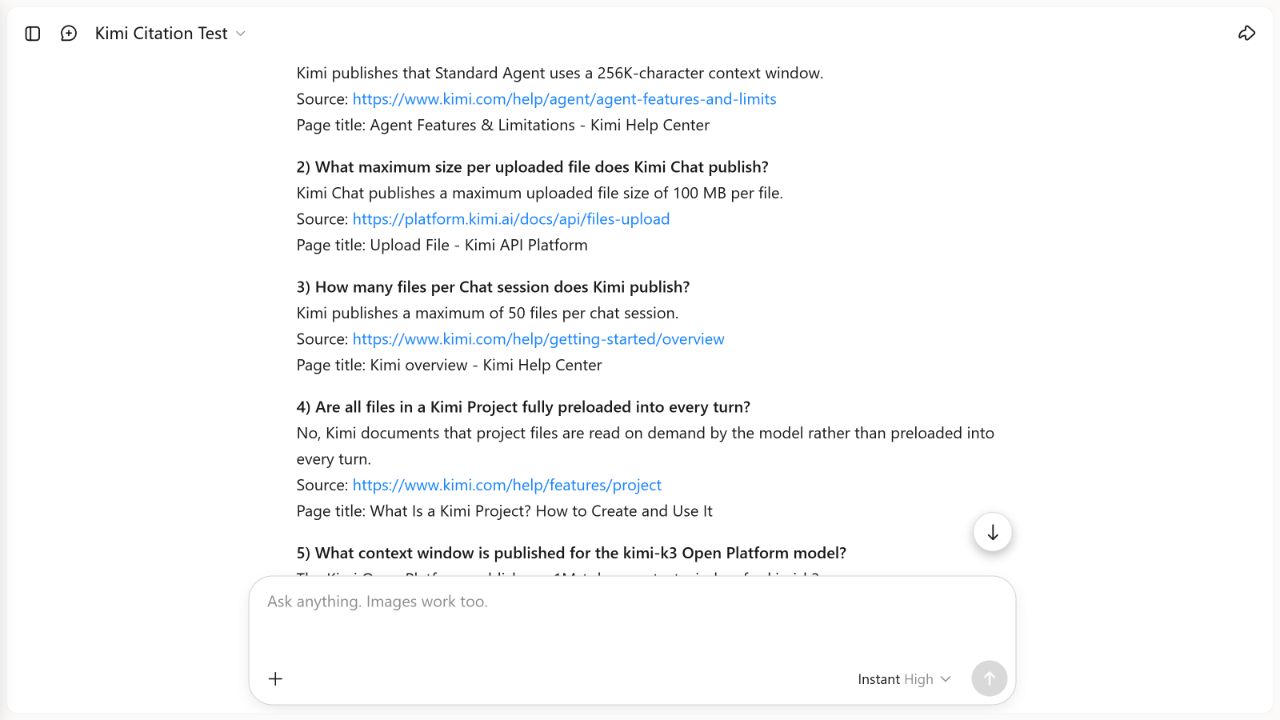
Our independent citation test lives on a separate page
The published Kimi Search Citation Accuracy Test contains our dated test question set, exact scoring rules, screenshots, routing observations and measured findings. This guide deliberately does not duplicate its numerical results.
Keeping the two intents separate prevents three problems:
- a workflow guide becoming stale when a benchmark is rerun;
- a small controlled test being mistaken for universal product quality; and
- search-result pages competing with each other for the same query.
Use this page to operate and verify Kimi Search. Use the test page when you want independent evidence about the specific citation runs that were actually completed.
A practical pre-use checklist
- Start a clean chat for a new research question.
- State the as-of date, region, units and decision.
- Prefer primary sources and explain acceptable exceptions.
- Use the Web search state visible in your own interface.
- Require claim-level direct URLs and source dates.
- Open the original source rather than trusting a snippet.
- Check resolution, direct support, scope, time and context.
- Separate vendor claims from independent observations.
- Recalculate important numbers outside the model.
- Do not upload private images or confidential source material without authorization.
- Escalate legal, medical, financial or safety decisions to a qualified professional.
Related Kimi guides
- Browse all Kimi AI guides
- How to use Kimi AI Chat
- Kimi Deep Research: workflow, sources and limits
- Kimi Search Citation Accuracy Test
Methodology and limits of this guide
The KI AI Team reviewed the English Kimi Help Center’s Agentic Search page, Kimi overview, product comparison and current Terms on August 5, 2026. We resolved the cited pages and compared their search-control wording. We did not submit a new search prompt, inspect account-specific interface state, test image search, query a specialist database or count Kimi’s claimed source inventory.
The Help Center is first-party vendor documentation. It establishes what Kimi currently says the product does; it does not independently establish completeness, reliability or accuracy. Interface controls, models, source integrations and regional access may change after the fact-check date.
Read How We Test Kimi AI for our general evidence rules and Sources and Corrections to report a specific unsupported or outdated statement.
Frequently asked questions
Does Kimi always search the web automatically?
Current official pages conflict. One describes a Web search Auto/Off control; another says Kimi decides automatically with no manual toggle. Follow the live control in your account and record its exact state for any test.
Does a citation mean the answer is correct?
No. Confirm that the cited page loads and directly supports the exact claim, product scope, date and context. Kimi’s own Terms say search sources are third-party material and output should be independently evaluated.
Can Kimi find where an image came from?
Kimi documents image-origin search, similar-image retrieval and image-related background research. A returned candidate is not proof of the earliest source, copyright owner or authenticity; compare the original pages and visual details yourself.
Can Kimi read any URL I paste?
No. Kimi documents limitations for password-protected or crawl-restricted pages, dynamically loaded content and shared Kimi conversation links.
Is Kimi Search the same as Deep Research?
No. Search is the narrower retrieval layer for current answers, image search and direct URLs. Deep Research is intended for longer multi-stage reports and needs its own methodology.
Did KI AI Guide run a new search test for this guide?
No. Status: DOCUMENTATION AND SOURCE AUDIT COMPLETE / NO NEW KIMI SEARCH RUN. The completed independent runs and their limits remain on the citation accuracy test page.
Official sources
All sources were checked August 5, 2026.