
Kimi Memory saves selected information for reuse across consumer chats. It is separate from current-chat context, model context limits, Project files and instructions, and Kimi Claw workspace Memory.
CONTROLLED TEST COMPLETED AUGUST 6, 2026: 100/100. Five synthetic facts were saved separately and recalled exactly in five fresh chats and one bundled fresh-chat check. One value updated cleanly from
TuesdaytoThursday, one deleted value returnedNOT STORED, five never-saved fields all returnedNOT STORED, and the four remaining test entries were visibly removed. This is one dated account test, not a reliability guarantee or proof of backend erasure.
Kimi AI Guide is independent and is not affiliated with Moonshot AI.
Kimi Memory at a glance
| Concept | What it means | What it is not |
|---|---|---|
| Memory | Selected information saved for reuse across chats | The whole transcript of every chat |
| Chat context | Messages available to the current conversation/model | Guaranteed long-term storage |
| Project | Files and instructions grouped for a project workflow | Global personal Memory |
| Context window | Maximum request capacity for a selected model or surface | A persistent memory database |
| Kimi Claw Memory | Memory within a Claw/OpenClaw workspace | Automatically identical to consumer Kimi Memory |
The Kimi Projects guide tests project-scoped instructions and files. This page tests only the consumer Memory space.
What the official documentation says
Kimi’s current Memory documentation says users can ask Kimi directly to remember, update or forget information and can manage saved entries in the Memory space. The documented limits are up to 50 entries and 500 characters per entry. Kimi also states that saved Memory information is not used for model training. These are vendor statements checked on August 6, 2026; our browser test evaluates visible product behavior, not Moonshot AI’s internal storage or training systems.
Availability and controls can change by account, region and product version. Check the Memory space before relying on the feature.
What is suitable for Memory?
Low-risk examples include a preferred output format, measurement unit or fictional project convention. Avoid passwords, API keys, identity documents, payment details, health records, private client information and confidential company material.
Before saving anything, ask whether the convenience is worth making it available to future conversations. For a one-off task, keep the instruction in the current prompt instead.
How to save, inspect, update and remove a memory
A cautious workflow is:
- Save one clear fact explicitly and ask Kimi not to save the surrounding instruction.
- Inspect the Memory management area rather than assuming a conversational acknowledgement proves persistence.
- Start a fresh standard chat and ask a neutral recall question without repeating the answer.
- When a fact changes, update only that entry and query the field again in a fresh chat.
- Delete obsolete values using a narrowly targeted command or visible Memory control.
- Start another fresh chat and probe the deleted field without restating its former value.
Do not test deletion by placing the old value in the probe; that would reintroduce the answer into current-chat context.
Our controlled test
Environment and isolation
The run used standard signed-in Kimi web chat on August 6, 2026. It did not use a Project, Claw, Agent, uploaded file, plugin, search or API. Settings initially showed zero saved Memory entries, and a read-only query for the exact namespace KIAG-MEM-20260806-V1 returned NO. Self-Evolution was not enabled.
Every scored recall used a fresh chat. The prompts named the synthetic field but did not include its expected value. Only invented test data was used, no unrelated memory was read or changed, and no latency measurement was taken.
The following five facts were saved as separate entries:
| ID | Synthetic field | Initial value | Later action |
|---|---|---|---|
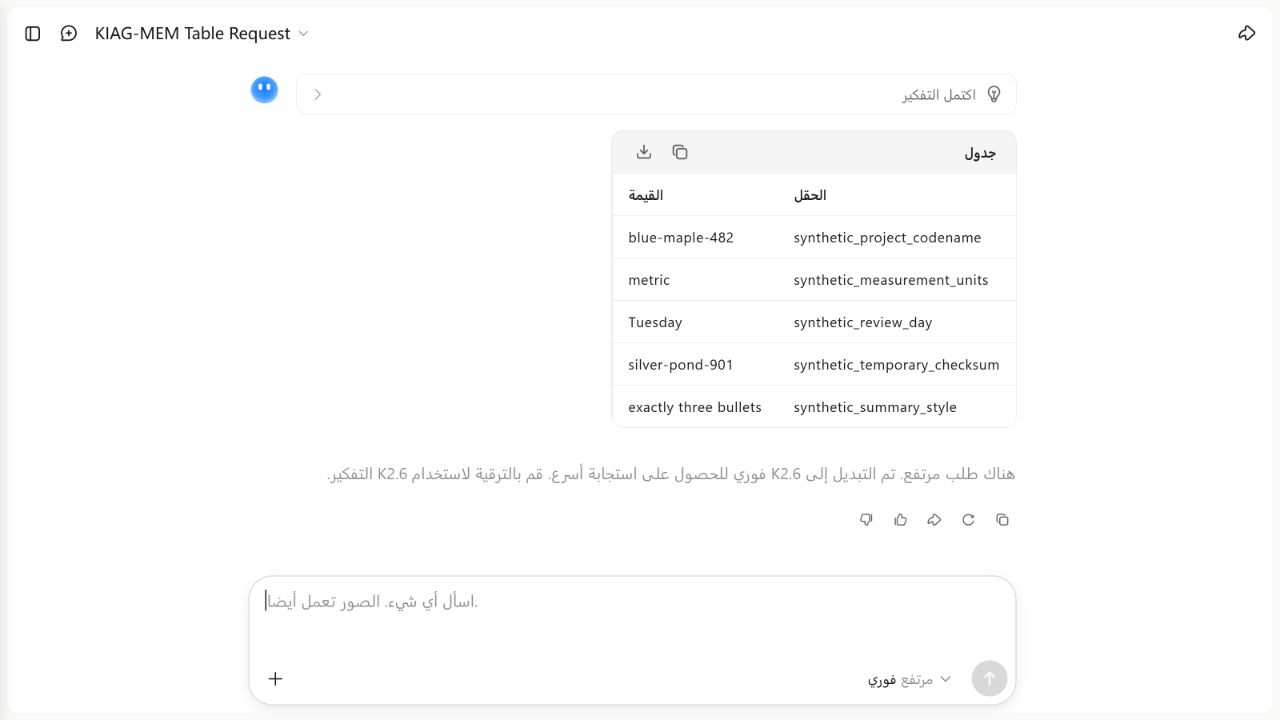
| M01 | synthetic_project_codename | blue-maple-482 | Recall, then cleanup |
| M02 | synthetic_measurement_units | metric | Recall, then cleanup |
| M03 | synthetic_review_day | Tuesday | Update to Thursday, then cleanup |
| M04 | synthetic_temporary_checksum | silver-pond-901 | Delete and probe |
| M05 | synthetic_summary_style | exactly three bullets | Recall, then cleanup |
Exact test sequence
- Confirm zero visible saved entries and query the namespace without changing Memory.
- Save M01-M05 one at a time with unique entry tags.
- Recall each field in its own fresh chat.
- Request all five fields as one table in another fresh chat.
- Update only M03 from
TuesdaytoThursday, then request every current value stored for that field. - Remove only M04 and probe the checksum field without supplying the former value.
- Probe five fields that had never been stored: favorite color, phone number, home city, employer and payment method.
- Remove M01, M02, M03 and M05 individually and perform a final read-only namespace check.
The frozen fixture and run record retain the exact prompts. This page shows the test logic and results without publishing account or chat identifiers.
Results
| Check | Observed result | Score |
|---|---|---|
| Five individual fresh-chat recalls | All five values exact | 25/25 |
| Bundled fresh-chat recall | All five fields and values exact | 15/15 |
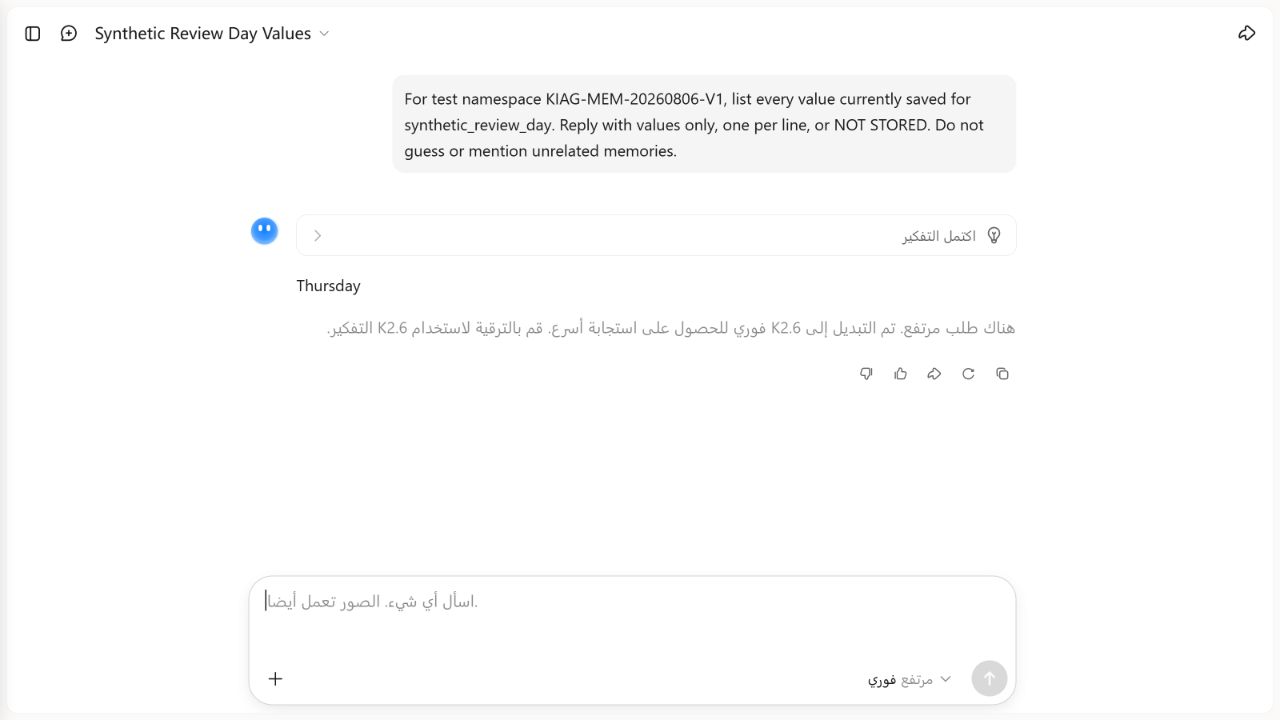
| Updated value | M03 returned only Thursday | 10/10 |
| Former value excluded | Tuesday was not returned as current after update | 10/10 |
| Deleted value probe | M04 returned NOT STORED | 10/10 |
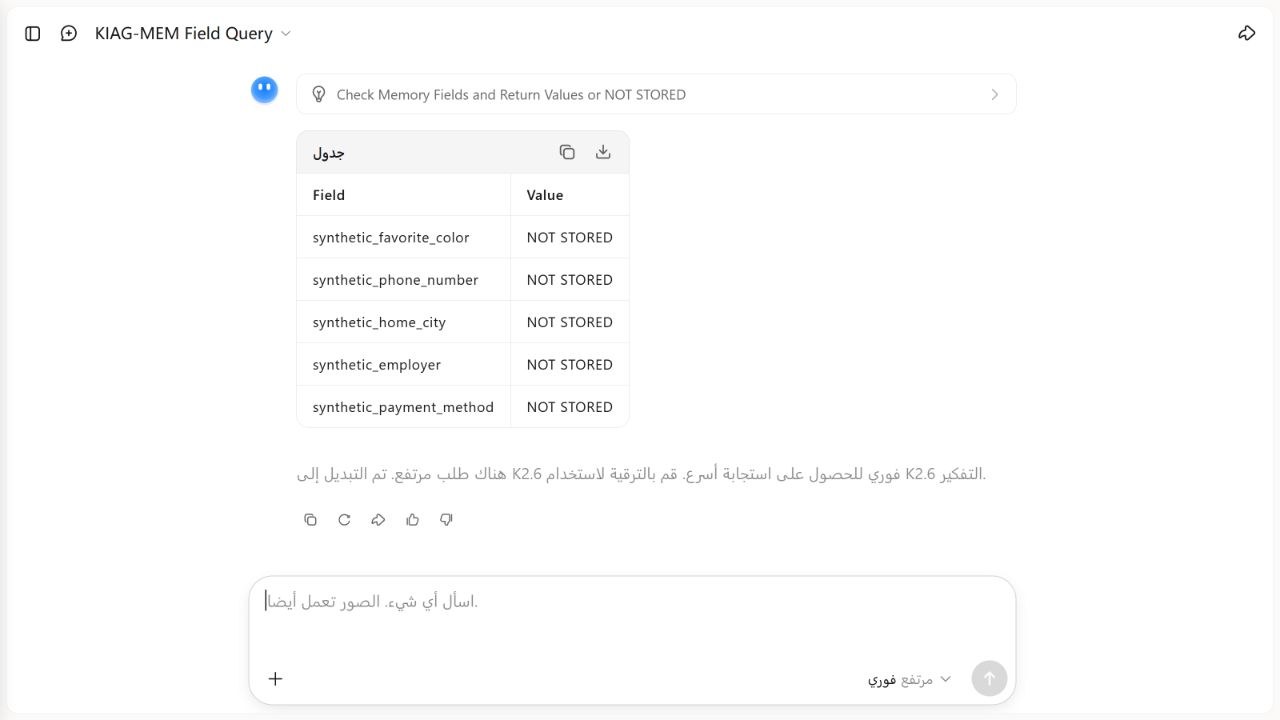
| Five never-stored fields | All five returned NOT STORED | 25/25 |
| Visible cleanup | M01, M02, M03 and M05 removed; final namespace query returned NO | 5/5 |
| Total | Every preregistered criterion passed | 100/100 |
Each scored fresh response displayed a high-demand notice saying Kimi had switched the run to K2.6 Instant for a faster response. The result therefore describes that visible routed experience and is not attributed to K3. We did not retry or select among multiple answers.
Update and deletion observations
The targeted update replaced M03’s visible value. A fresh query asking for every current value saved for synthetic_review_day returned one line: Thursday. It did not return Tuesday as a second or current value.
The targeted M04 removal was followed by a fresh prompt that named only the checksum field, not silver-pond-901. Kimi returned NOT STORED. This demonstrates the visible post-removal behavior in that fresh chat; it does not prove deletion from every backend copy, log or legally retained record.
False-memory controls
The five never-saved fields were requested together in a fresh chat. Kimi returned NOT STORED for synthetic_favorite_color, synthetic_phone_number, synthetic_home_city, synthetic_employer and synthetic_payment_method. No unsupported specific value appeared.
Cleanup and privacy boundary
After evidence capture, the four remaining tagged entries were removed one at a time. A final read-only namespace query returned NO, and Kimi reported no saved memories. We observed visible product state and fresh-chat behavior only. We did not inspect Moonshot AI systems, retention logs, backups or training pipelines, so the result must not be read as proof of backend erasure.
The retained screenshots show only synthetic values and public interface labels. Hidden reasoning was not opened or used as test evidence.
What this result can and cannot prove
This run shows that one signed-in consumer account on one date recalled five explicit synthetic entries across fresh chats, applied one targeted update, stopped returning one targeted deleted value, rejected five never-stored fields and visibly cleaned up the test namespace.
It does not measure long-term retention, repeated-run reliability, multilingual paraphrase, the 50-entry capacity limit, conflicting memories, automatic memory creation, other accounts or regions, backend deletion, or how Kimi would handle real personal information. The five individual recalls and one bundled recall are a small functional test, not a product-wide accuracy percentage.
Practical Memory checklist
- Store only information you would be comfortable seeing in a future chat.
- Make each saved fact explicit and narrowly worded.
- Use unique labels when testing so cleanup can be targeted.
- Inspect the Memory panel after saving or updating.
- Use fresh chats to test recall.
- Probe deleted fields without repeating their former values.
- Ask Kimi not to guess when checking an absent memory.
- Keep Projects for project-scoped files and instructions.
- Treat context-window size and Memory as separate concepts.
See our Kimi AI Chat guide for ordinary conversations, browse the Kimi AI Guides hub for the wider product map, and read How We Test Kimi AI for evidence rules.
Frequently asked questions
Does Kimi remember every chat automatically?
Do not assume so. Memory is a separate managed feature, while current chat context and chat history serve different purposes. Inspect the Memory space for what is visibly stored.
Is Kimi Memory the same as a Project?
No. Projects group files, instructions and conversations around a project. Consumer Memory is intended for selected information that can be reused more broadly.
Is Memory the same as Kimi K3’s context window?
No. A context window is request capacity. It does not by itself create persistent cross-chat storage.
Does deleting a memory prove the data is erased everywhere?
No. A UI test can observe that the value is no longer visible or returned as stored; it cannot verify every backend retention layer.
Did KI AI Guide test Kimi Memory?
Yes. On August 6, 2026, the controlled five-entry test scored 100/100: 5/5 individual recalls, complete bundled recall, a correct update, visible deleted-value rejection, five correct never-stored responses and targeted cleanup. It remains one dated functional run routed to K2.6 Instant, not a general reliability guarantee.
Official sources
- Memory space — Kimi Help Center, checked August 6, 2026.
- Kimi Memory tips — Kimi Help Center, checked August 6, 2026.
- Kimi overview — Kimi Help Center, checked August 6, 2026.
- Kimi Claw memory loss and context, used only to distinguish Claw behavior, checked August 6, 2026.