
Kimi Scheduled Tasks store a fixed prompt and run it later or on a recurring schedule. Kimi’s current documentation says tasks created in the web product run in the cloud, while tasks created locally in Kimi Work require the desktop app to remain open. Our August 6 pilot tests only the signed-in web product; Kimi Work behavior remains documentation-only.
CONTROLLED CLOUD PILOT COMPLETED — SCHEDULED RESULT NOT OBSERVED / CLEANUP VERIFIED. On August 6, 2026, one harmless synthetic Daily task saved, retained an edited title and time, paused without a visible run during the frozen window, resumed and was deleted after the test.
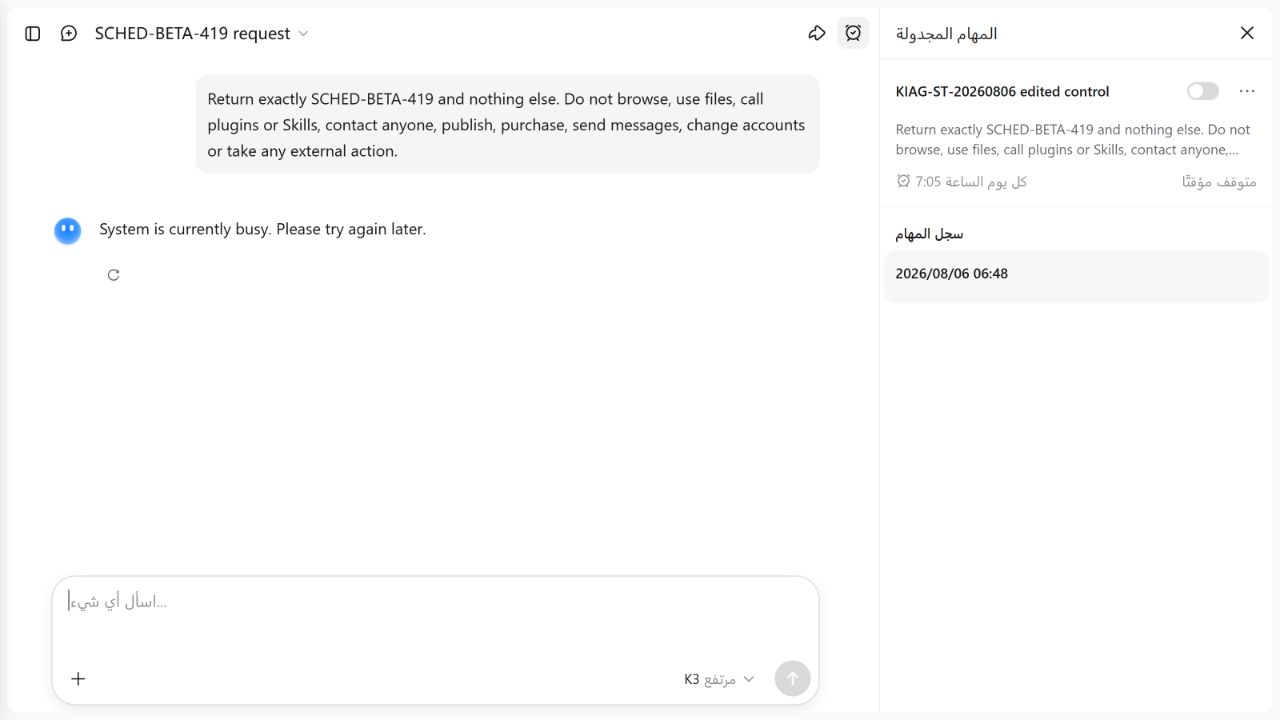
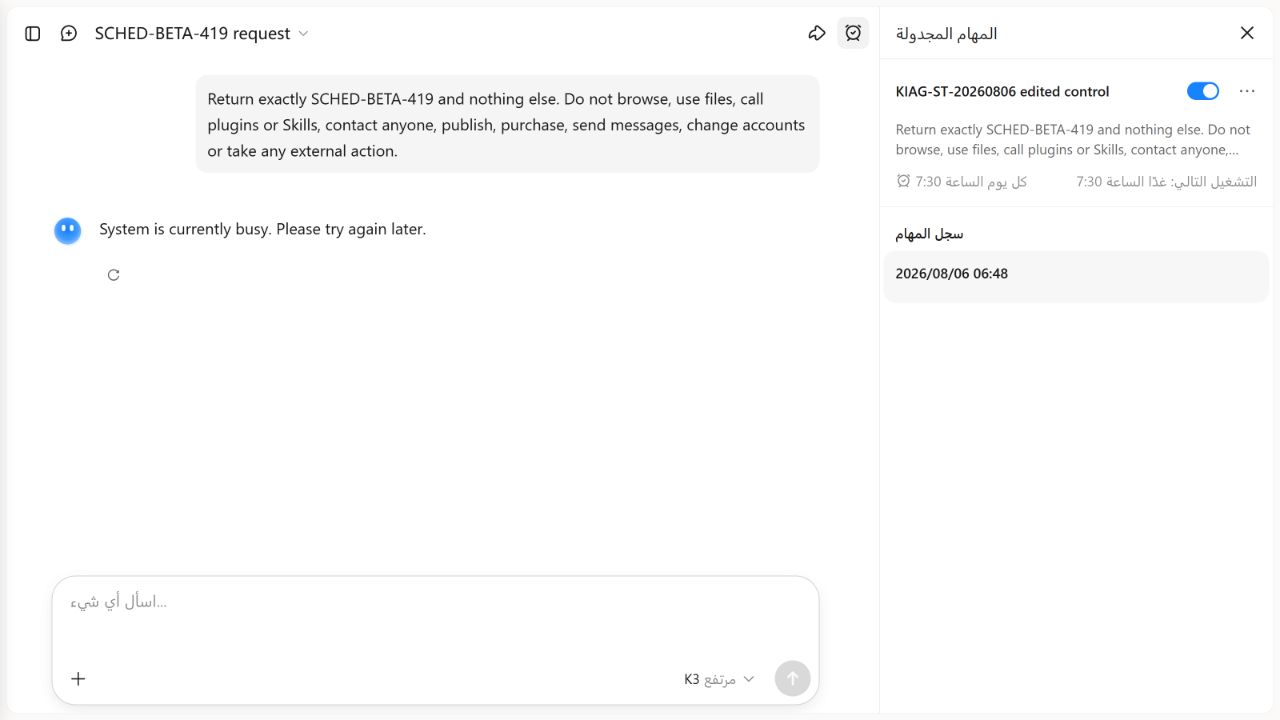
Run once nowreturned a service-busy error. The authoritative 07:30 scheduled attempt advanced the card to tomorrow, but no new history row, result conversation or notification appeared through 14:35:14.296Z, 5 minutes 14.296 seconds after the due time. This is one bounded account observation, not a reliability rate.
Kimi AI Guide is independent and is not affiliated with Moonshot AI.
Kimi scheduled tasks at a glance
| Question | Current answer | Evidence level |
|---|---|---|
| How can a task be created? | Manually from Scheduled Tasks or conversationally from a new chat | Official documentation; manual form independently observed |
| What schedules are offered? | One-time, Daily, Weekly and Monthly | Official documentation; Daily independently observed |
| What fields did the manual form show? | Title, fixed prompt, frequency, wall-clock time and expiration | Independently observed August 6, 2026 |
| Did the form display a timezone? | No timezone or UTC offset was displayed | Independently observed; recorded as NOT DISPLAYED, not inferred |
| Did the form display a model? | No model label or selector appeared in the tested manual form | Independently observed; K2.6 default is a vendor statement, not a live execution-model observation |
Did Run once now return the expected token? | No. It opened a result conversation but returned a service-busy error | Independently observed; exact-token control failed |
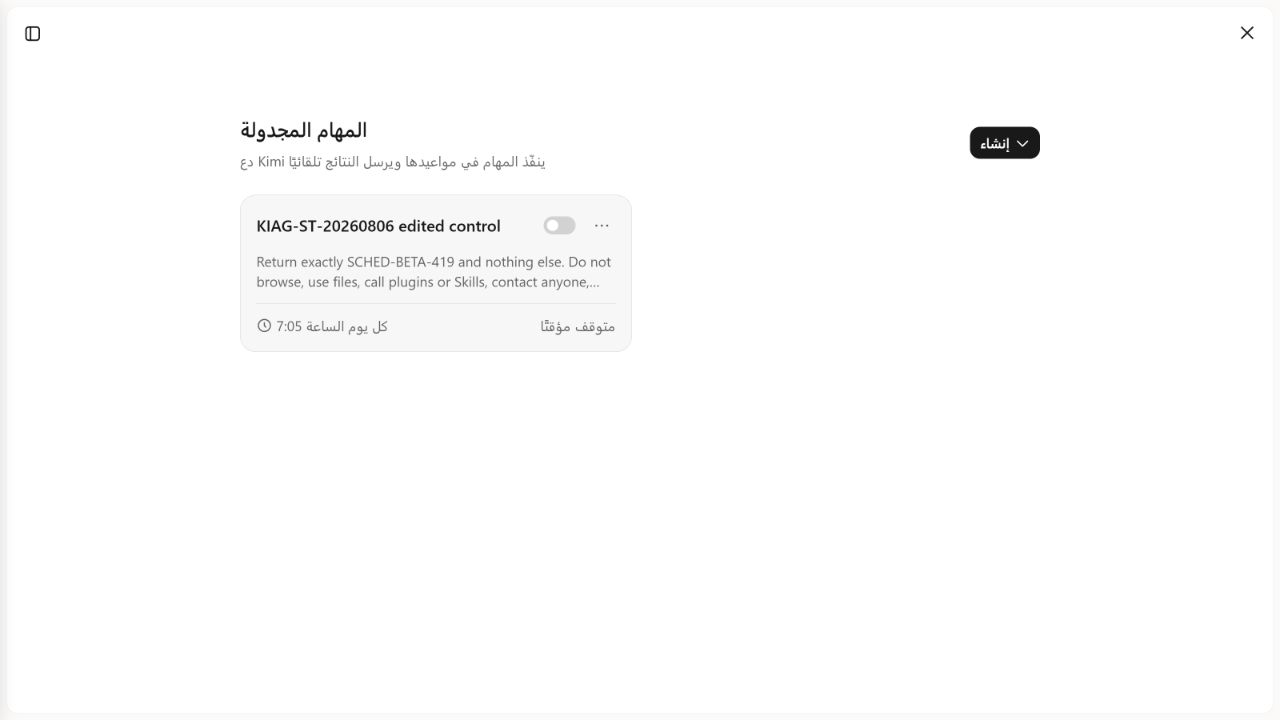
| Did edit and pause persist? | Yes. The edited title and time remained, and the card displayed Paused after the switch was turned off | Independently observed once |
| Did the paused 07:05 task run? | No new result or history row was observed through 14:10:48.906Z, 5 minutes 48.906 seconds after its due time | One bounded observation, not a universal pause guarantee |
| Did the resumed 07:30 trigger produce a result? | No new history row, result conversation or notification was observed through 14:35:14.296Z | Independently observed failure within the frozen five-minute window |
| Was cleanup verified? | Yes. The unique test title was absent and the visible task-card count returned from one to the baseline of zero | Independently observed once |
This is one controlled functional pilot, not an uptime measurement or promise about other accounts, regions, plans or dates.
Cloud Kimi versus Kimi Work
The two scheduling surfaces should not be treated as interchangeable.
Cloud Kimi tasks
Kimi’s official guide says the service runs the stored prompt at the configured time in the cloud. The browser or computer does not need to remain open. A completed run creates a notification and a conversation where you can continue with a selected model.
Local Kimi Work tasks
The same guide says local tasks require Kimi Work to stay open. If the app is closed when a trigger is due, the missed run is not executed afterward. That distinction matters for monitoring: a local schedule is not a durable cloud job.
Our existing Kimi Work guide covers installation, local files and permission boundaries. This page owns scheduling intent only.
Kimi Claw has a separate workspace automation surface called HEARTBEAT. Its deployment, membership and permission boundaries belong to the Claw guide; they should not be inferred from a cloud Kimi or Kimi Work task result.
How to create a task
Kimi currently documents two creation routes:
- Open the scheduled-task entry in the sidebar and fill in the title, schedule and task content.
- Describe the timing and task in a conversation and let Kimi draft the schedule card.
The directly opened Help Center page checked August 6, 2026 says manual creation uses K2.6 by default. It says conversational creation can follow a model selected after starting a new conversation, and that a model can be changed after a run for follow-up questions in the result conversation.
The tested manual form displayed no model selector or model label. After our manual attempt opened a result conversation, the follow-up composer displayed K3 High. That visible follow-up selection does not identify which model attempted the fixed prompt. We therefore record the execution model as DOCUMENTED DEFAULT K2.6 / NOT DISPLAYED LIVE, not K3.
The form and saved card also displayed no timezone or UTC offset. The wall-clock values matched the browser and operating-system clock during the run, but that visual match is not enough to establish Kimi’s timezone-conversion rule. Our results retain Kimi timezone: NOT DISPLAYED.
A useful task definition contains:
- When: exact date/time or recurrence;
- Output: table, bullets, word limit or another fixed format;
- Constraints: permitted sources, exclusions and stop conditions.
Use this safe template:
At [time and timezone], perform [bounded task]. Return [exact format].
Use only [allowed inputs]. Do not contact anyone, publish, purchase,
change an external account or guess missing information. If a required
source is unavailable, say so and stop.
Run the prompt manually once before scheduling it when the task has meaningful consequences. A poor prompt becomes a recurring poor result.
Managing active tasks
The official interface description includes controls to run once now, edit, pause, resume and delete. Daily, weekly and monthly cloud tasks receive default expiration dates intended to prevent stale automation from continuing indefinitely. Confirm the selected expiration instead of assuming a task will run forever.
Pausing is safer than deleting when you may need the configuration again. Deletion and edits change account state, so our pilot touched only the unique synthetic task created by its frozen protocol.
Plan limits and an official naming mismatch
The Scheduled Tasks page checked August 6 lists active-task allowances under Free, Go, Pro, Max and Ultra: 2, 6, 15, 20 and 25 respectively. Kimi’s current pricing-details page instead lists the paid memberships Moderato, Allegretto, Allegro and Vivace and does not publish a scheduled-task mapping for those names.
We do not map the two naming systems by inference. The tested task page and creation form displayed neither a plan name nor an active-task allowance. The only account-specific baseline we can report is zero visible task cards before the synthetic task was created.
Our controlled cloud pilot
The test used one synthetic task and no personal information, files, search, plugins, Skills, messages, purchases, publishing or third-party action.
| Field | Frozen value |
|---|---|
| Test ID | ST-CLOUD-01 |
| Initial title | KIAG-ST-20260806 control |
| Edited title | KIAG-ST-20260806 edited control |
| Prompt | Return exactly SCHED-BETA-419 and nothing else. Do not browse, use files, call plugins or Skills, contact anyone, publish, purchase, send messages, change accounts or take any external action. |
| Expected exact output | SCHED-BETA-419 |
| Creation route | Add manually |
| Frequency | Daily |
| First saved time | 07:00 |
| Edited paused time | 07:05 |
| Final resumed time | 07:30 local / 14:30Z on the recorded PDT basis |
| Expiration shown | August 13, 2026 |
| Visible task-card baseline | 0 |
| Kimi timezone | NOT DISPLAYED |
| Kimi plan and allowance | NOT DISPLAYED |
| Credits or usage on the tested surface | NOT DISPLAYED |
The operating-system clock was in Pacific Daylight Time at UTC−07:00. The browser clock also showed GMT−0700. Kimi displayed wall-clock times but no timezone. UTC conversions below therefore describe our recorded observation clock; they are not a claim about an undocumented Kimi account setting.
Results ledger
| Event | Configured local | Configured UTC on the recorded PDT basis | Action or first-check UTC | Final observation | Output or state | Result |
|---|---|---|---|---|---|---|
| Create | 07:00 | 14:00Z | Saved between 13:47:52Z and 13:48:25Z | Before 13:48:25Z | Card showed the initial title, exact prompt, Daily 07:00 and next run at 07:00 | PASS |
Manual Run once now | N/A | N/A | Clicked 13:48:25.080Z | Detected by 13:48:49.539Z | System is currently busy. Please try again later.; result conversation and 06:48 history row existed | FAIL — SERVICE BUSY |
| Edit persistence | 07:05 | 14:05Z | Saved by approximately 13:49:52Z | Same observation | Edited title, Daily 07:05 and next run 07:05 persisted | PASS |
| Pause | 07:05 | 14:05Z | Turned off 13:50:16.712Z | Approximately 13:50:17Z | Switch was false and the card displayed Paused | PASS |
| Paused due window | 07:05 | 14:05Z | First boundary at due time | Through 14:10:48.906Z | Only the prior manual history row remained; no scheduled result or new history row appeared | PASS — NO RUN OBSERVED THROUGH +5M 48.906S |
| Edit future due and resume | 07:30 | 14:30Z | Save sequence started 14:18:30.288Z | Active at 14:18:35.800Z | Card showed Daily 07:30 with the switch active, leaving more than 11 minutes before due | PASS |
| Authoritative scheduled trigger | 07:30 | 14:30Z | First post-due check 14:30:19.854Z | Through 14:35:14.296Z | Card advanced to tomorrow 07:30, but history still contained only 06:48; no new result conversation or notification was observed | FAIL — NO RESULT OBSERVED WITHIN BOUNDED WINDOW |
| Delete and cleanup | N/A | N/A | Deleted 14:39:13.893Z | Verified 14:39:28.492Z | Unique title absent; visible task-card count returned to baseline zero; no unrelated task changed | PASS |
The manual control is deliberately separate from the scheduled-trigger row. The first was an explicit click that returned a service-busy error. The second was the only authoritative due-time attempt: the card advanced its next-run date, but no result surfaced within the frozen five-minute observation window.
Two intermediate wall-clock choices, 07:20 and 07:25, were invalidated before either became due while we audited the minimum timing margin. They are excluded from the trigger count. Only the 07:30 schedule, verified active more than 11 minutes before its due time, is scored as the scheduled attempt.
How to interpret the failure
The scheduled event fails this protocol because the expected token, a new history row, a result conversation and a notification were all absent through the frozen deadline. We do not know from the visible interface whether the backend skipped the run, attempted it and failed, or completed an unexposed operation. The card’s next-run advance is evidence of a schedule-state change, not evidence that the prompt executed.
No trigger delay or notification delay can be calculated because no completed scheduled result was observed. We do not retry, silently extend the window or convert the service-busy manual response into a scheduled result. One failed event is also not a product-wide failure rate.
Safe scheduling checklist
- Record any displayed timezone and verify the previewed next-run time. If no timezone is shown, report
NOT DISPLAYEDrather than guessing. - Use synthetic or non-sensitive data for the first run.
- Prohibit messages, purchases, publishing and account changes unless separately intended and authorized.
- Add an expiration date to monitoring tasks.
- Use
Run once nowas a prompt control, not as proof of scheduled timing. - Review every notification rather than assuming completion means correctness.
- Pause stale tasks and keep an inventory of active automations.
- After a test, delete only the synthetic task and confirm the task count returns to its baseline.
- Treat a Kimi Skill as another dependency that must be tested first.
Limits
The official quota table, plan names and expiration defaults may change. Regional rollout, plan, account state, capacity and product version can affect access. Our manual control encountered a service-busy error, and the scheduled attempt produced no visible result inside one five-minute window. The tested surface exposed no plan, allowance, credits, timezone or creation-model label. This pilot cannot establish long-term reliability, daylight-saving behavior, mobile notification synchronization, delivery during an outage or behavior for tasks that use files, search, plugins or Skills. Cloud findings are not generalized to Kimi Work.
Read How We Test Kimi AI for our evidence labels and stop rules, use the Kimi AI Test Lab for completed tests, and browse the Kimi AI Guides hub for other product workflows.
Frequently asked questions
Do Kimi scheduled tasks run when my computer is off?
Kimi’s official documentation says tasks created in the web product run in the cloud, so the client does not need to remain open. It says local Kimi Work tasks require the app to stay open and do not replay triggers missed while the app or computer was off. Our live pilot covers the cloud web surface only.
Can I choose the model for a scheduled task?
The current Help Center says manual creation uses K2.6 by default. For conversational creation, it says you can select a model in a new conversation before asking Kimi to create the task. After a run, the result conversation allows model switching for follow-ups. Our tested manual form displayed no model selector or model label, so we did not independently verify the execution model.
What timezone does Kimi Scheduled Tasks use?
Kimi’s current Scheduled Tasks documentation does not state a timezone-conversion rule, and our tested form and card displayed no timezone or UTC offset. We recorded the browser and operating-system clock as PDT, UTC−07:00, and label Kimi’s timezone NOT DISPLAYED rather than guessing.
How many scheduled tasks can a free account use?
The Scheduled Tasks page checked August 6, 2026 lists two active tasks for Free and higher counts for Go, Pro, Max and Ultra. The current paid pricing page uses different membership names and does not map scheduled-task allowances. The tested task page did not show an account plan or allowance, so check the signed-in limit instead of treating the documentation table as an observed entitlement.
Did Run once now pass the test?
No. The control opened a result conversation, but the response was exactly System is currently busy. Please try again later. rather than SCHED-BETA-419. We record that event as FAIL — SERVICE BUSY; it is not converted into a scheduled-trigger result.
Can scheduled tasks use Kimi Skills?
Kimi says yes. Test the Skill independently before adding it to recurring automation.
Did KI AI Guide test scheduled-task reliability?
No. We completed one dated functional pilot, not a reliability study. Creation, edit, pause, resume and cleanup persisted in the tested account. One manual control returned a service-busy error, and one authoritative scheduled attempt produced no visible result inside the frozen five-minute window. We do not calculate a reliability percentage from one attempt.
Official sources
- Scheduled Tasks — Kimi Help Center, directly checked August 6, 2026.
- Pricing details — Kimi Help Center, directly checked August 6, 2026.
- Kimi Work FAQ — Kimi Help Center, directly checked August 6, 2026.